
coredump_fault#
Overview#
The coredump_fault example demonstrates the basic usage of debug/coredump component.
In this example, a Usagefault is intentionally triggered using a division-by-zero operation. The fault is then captured in the UsageFault_Handler, where the cause of the fault, the current Exception Stack Frame (ESF), and partial RAM contents are saved to flash memory using the coredump component.
Afterward, a software reset is triggered. Upon reboot, the fault’s cause is analyzed using the API provided by the coredump component.
Please note that only flash targets are supported!
Running the demo#
Note: Once the program is download to the target board, please press Reset Button to reset program.
Expected log:
    Coredump Fault Example Start!
    Press any key to trigger usagefault...
    Coredump Fault Example Rebooted!!!
    Press any key to check coredump reason...
    [Info] Size: 3894.
    [Info] Reason: Usagefault caused by an integer divsion by zero!
How to debug#
Download the program and press SW1 to reset the program. Following log will be observed in terminal:
Coredump Fault Example Start! Press any key to trigger usagefault…Attach to running target with debugger.
Press any key in terminal.
Use GDB server to examine core dump data.#
This feature is verified on armgcc toolchain.
Save the data with an offset of 0x10 from the coredump flash partition(Define in
CONFIG_MFLASH_COREDUMP_REGION_START_ADDR) into a binary file (e.g., log.bin).Note: The offset should be 0x10. Otherwise [ERROR][parser] Log header ID not found… will reported.
Note: Recommend to use Ozone.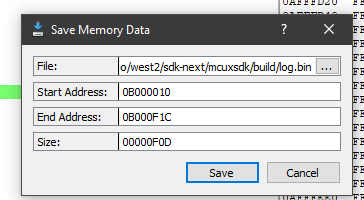
Start the custom GDB server using the script coredump_gdbserver.py with the core dump binary log file(saved in step 1) and example elf file as pararmeters:
python ../components/debug/coredump/scripts/coredump_gdbserver.py coredump_fault.elf log.bin --port=2331Start GDB:
arm-none-eabi-gdb.exe .\coredump_fault.elfInside GDB, connect to the GDB server via port 2331:
(gdb) target remote localhost:2331
Output from GDB Client:Remote debugging using localhost:2331 0x080051d8 in DEMO_TriggetUseFault () at C:/Arepo/west2/sdk-next/mcuxsdk/examples/component_examples/coredump_fault/coredump_fault.c:152 152 x = x / y;
Examine the Core registers:
(gdb) info registersOutput from GDB Client:r0 0x61 97 r1 0x200033b8 536884152 r2 0x0 0 r3 0x1 1 r4 0x0 0 r5 0x0 0 r6 0x0 0 r7 0x0 0 r8 0x0 0 r9 0x0 0 r10 0x0 0 r11 0x0 0 r12 0x12121212 303174162 sp 0x20003398 0x20003398 <ucHeap+2136> lr 0x80051f3 134238707 pc 0x80051d8 0x80051d8 <DEMO_TriggetUseFault+40> xpsr 0x61000000 1627389952
Examine the backtrace:
(gdb) btOutput from GDB Client:#0 0x080051d8 in DEMO_TriggetUseFault () at C:/Arepo/west2/sdk-next/mcuxsdk/examples/component_examples/coredump_fault/coredump_fault.c:152 #1 0x080051f2 in DEMO_FaultTriggerTask (parameters=<optimized out>) at C:/Arepo/west2/sdk-next/mcuxsdk/examples/component_examples/coredump_fault/coredump_fault.c:73 #2 0x00000000 in ?? () Backtrace stopped: previous frame identical to this frame (corrupt stack?)
Query thread info:
(gdb) info threadsOutput from GDB Client:Id Target Id Frame * 1 Thread 1 (name: ) 0x080051d8 in DEMO_TriggetUseFault () at C:/Arepo/west2/sdk-next/mcuxsdk/examples/component_examples/coredump_fault/coredump_fault.c:152 2 Thread 2 (name: DEMO_MainTask, state: 0x80, user_options: 0x0, prio: 0x3) <unavailable> in ?? () 3 Thread 3 (name: DEMO_FaultTriggerTa, state: 0x0, user_options: 0x0, prio: 0x3) <unavailable> in ?? () 4 Thread 4 (name: IDLE, state: 0x80, user_options: 0x0, prio: 0x0) <unavailable> in ?? () 5 Thread 5 (name: Tmr Svc, state: 0x2, user_options: 0x0, prio: 0x4) <unavailable> in ?? ()
Update default settings#
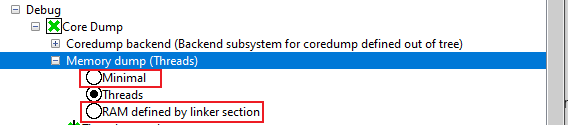
This example defaults to dumping thread structure and stacks of all threads, and user can switch to other memory type
by change “Memory dump” option in Kconfig.
Supported Boards#
FRDM-RW612
Hardware requirements
Micro USB cable
FRDM-RW612 board
Personal Computer
Board settings
Prepare the Demo
Connect a micro USB cable between the PC host and the MCU-Link USB port (J10) on the board
Open a serial terminal with the following settings:
115200 baud rate
8 data bits
No parity
One stop bit
No flow control
Download the program to the target board.
Launch the debugger in your IDE to begin running the demo.
FRDM-MCXW71
Hardware requirements
Type-C USB cable
FRDM-MCXW71 Board
Personal Computer
Board settings
Prepare the Demo
Connect a USB cable between the host PC and the FRDM board J10.
Open a serial terminal with the following settings:
115200 baud rate
8 data bits
No parity
One stop bit
No flow control
Download the program to the target board.
Either press the reset button on your board or launch the debugger in your IDE to begin running the demo.