
host_cdc_ecm#
Overview#
The host CDC-ECM project is a simple demonstration program based on the MCUXpresso SDK . It demonstrates Ping and UDP echo server, it also join into a multicast group. The application periodically sends the ICMP echo request to a PC and processes the PC reply and always forwarding UDP message on echo port.
System Requirement#
Hardware requirements#
Mini/micro USB cable
USB A to micro AB cable
Hardware (Tower module/base board, and so on) for a specific device
Personal Computer (PC)
Software requirements#
The project path is:
<MCUXpresso_SDK_Install>/boards//usb_examples/usb_host_cdc_ecm/ / .
The
is Bare Metal or FreeRTOS OS.
Getting Started#
Hardware Settings#
For detailed instructions, see the appropriate board User’s Guide.
Set the hardware jumpers (Tower system/base module) to default settings.
Prepare the example#
Connect a USB cable between the PC host and the USB port on the target board with these settings:
115200 baud rate
8 data bits
No parity
One stop bit
No flow control
Make sure to use a USB HUB or an adapter with OTG functionality firstly. Connect the target board to the external power source (the example is self-powered).
Download the program to the target board.
Power off the target board, then power on again.
For detailed instructions, see the appropriate board User’s Guide.
Run the example#
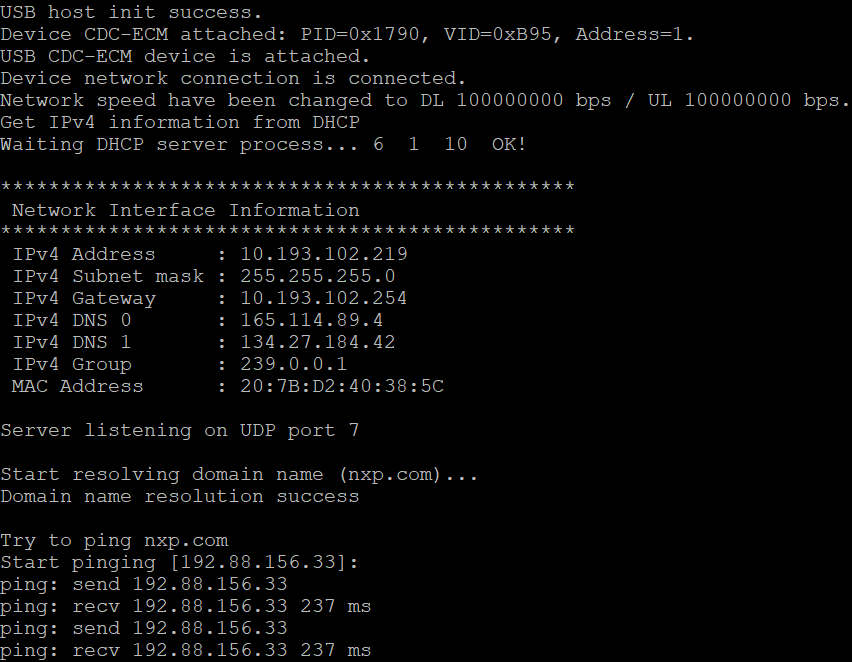
Connect serial port to board and run the example host_cdc_ecm , then plug in USB CDC-ECM device to the board. The log will printed like below:

If network link of CDC-ECM device is up, the example host_cdc_ecm will start DHCP service and join into a multicast group using IGMP. The example host_cdc_ecm will always listening on UDP port 7 and echo message to sender, then start Ping. The log will printed like below:
Supported Boards#
MCX-N5XX-EVK
MCX-N9XX-EVK
FRDM-MCXN947
FRDM-MCXN947T
RD-RW612-BGA
FRDM-RW612
FRDM-MCXA577