
Example Development#
Overview#
In addition to the sources, one example contains CMakeLists.txt, Kconfig, prj.conf and example.yml.
hello_world
    ├── hello_world.c
    ├── CMakeLists.txt
    ├── Kconfig
    ├── prj.conf
    ├── example.yml
CMakeLists.txt#
CMakeLists.txt defines the sources, includes and static configurations.
Based on the cmake built-in macro project, we customize the project to provide the following additional arguments:
Argument Name |
Argument Type |
Explanation |
|---|---|---|
PROJECT_BOARD_PORT_PATH |
Single |
Path for board porting files and data. |
PROJECT_DEVICE_PORT_PATH |
Single |
Path for device porting files and data. |
PROJECT_TYPE |
Single |
Specify the project type, can be |
CUSTOM_PRJ_CONF_PATH |
Multiple |
Specify customized prj.conf search paths. |
Here is the hello_world CMakeLists.txt:
cmake_minimum_required(VERSION 3.30.0)

include(${SdkRootDirPath}/cmake/extension/mcux.cmake)

# Specify the project
project(hello_world LANGUAGES C CXX ASM PROJECT_BOARD_PORT_PATH ${board_root}/${board}/demo_apps/hello_world)

# Include device, board, drivers, components, middlewares, RTOS
include(${SdkRootDirPath}/CMakeLists.txt)

mcux_add_source(
    SOURCES hello_world.c
)
RTOSRTOS
mcux_add_include(
    INCLUDES .
)

# convert binary to .bin.
mcux_convert_binary(BINARY ${APPLICATION_BINARY_DIR}/${MCUX_SDK_PROJECT_NAME}.bin)
Kconfig#
Kconfig defines the dynamic configurations.
It is not required to always provide example specific Kconfig. If your example has specific Kconfig, then please follow the pattern to add it:
rsource "../../../Kconfig.mcuxpresso"

mainmenu "Hello world Example Run Time Configuration"

config HELLO_WORLD_EXAMPLE_MACRO
    bool "Hello world example macro"
    default y
    help
        "Hello world example macro"
rsource "../../../Kconfig.mcuxpresso"must be added to load the Kconfigs for all device, board, and other components.Set
mainmenuto give the GUI titleSet the example specific configurations
The Kconfig process will take the example specific Kconfig as the highest priority entry point. If not provided, then it will take the mcuxsdk/Kconfig.mcuxpresso instead.
prj.conf#
prj.conf here specifies the example specific configuration values for Kconfig symbols. It will be merged together with other prj.conf values from device, board and shield to produce the final configurations.
See prj.conf for more details.
example.yml#
example.yml contains data specifying example category, description, supported devices, boards and shields, etc. It is mainly for tool and CI usage.
Overview#
# yaml-language-server: $schema=../../../../scripts/data_schema/example_description_schema.json
hello_world:
  section-type: application
  contents:
    meta_path: examples/demo_apps/hello_world
    project-root-path: boards/${board}/demo_apps/hello_world/${multicore_foldername}
    document:
      name: hello_world${core_id_suffix_name}
      category: demo_apps
      brief: The HelloWorld demo prints the "Hello World" string to the terminal using
        the SDK UART drivers and repeat what user input. The purpose of this demo
        is to show how to use the UART, and to provide a simple project for debugging
        and further development.
      example_readme:
      - examples/demo_apps/hello_world/readme.md
      - ${board_root}/${board}/demo_apps/hello_world/example_board_readme.md
      - ${board_root}/${board}/examples_shared_readme.md
  boards:
    evk9mimx8ulp@cm33: []
    evkbimxrt1050:
    - +armgcc@flexspi_nor_sdram_debug
    - +armgcc@flexspi_nor_sdram_release
    - +armgcc@sdram_txt_debug
    - +armgcc@sdram_txt_release
    - +iar@flexspi_nor_sdram_debug
    - +iar@flexspi_nor_sdram_release
    - +iar@ram_0x1400_debug
    - +iar@ram_0x1400_release
    - +iar@sdram_txt_debug
    - +iar@sdram_txt_release
    - +mdk@flexspi_nor_sdram_debug
    - +mdk@flexspi_nor_sdram_release
    - +mdk@ram_0x1400_debug
    - +mdk@ram_0x1400_release
    - +mdk@sdram_txt_debug
    - +mdk@sdram_txt_release
Example Toolchains and Targets#
The supported toolchains and build configuration targets for an example can be got in the following way:
Get the designated board example.yml to get the board default supported toolchains and build configuration targets from board.toolchains.
This is for board examples. For device examples, it should be the device example.yml. We don’t have such cases public yet.
Get the designated board from
boardsdata attributeIf the data attribute is empty, then the board level toolchains and build configuration targets are the example ones.
If the data attribute exists,
+to add extra toolchains and build configuration targets pairs with the board ones.-to reduce extra ones from board ones.
The mcuxsdk/scripts/data_schema/example_decription_schema.json is provided to specify detailedly the data attributes for the example.yml.
Example Types#
Board Examples and Device Examples#
MCUXpresso SDK supports both board examples and device examples. The board examples are based on board and the mounted device while device examples only use target device without board. For hierarchical configuration for porting, board examples use PROJECT_BOARD_PORT_PATH, device examples use PROJECT_DEVICE_PORT_PATH.
Since most examples are board examples, we will focus on board examples for illustration in later chapters.
Repository Examples and Freestanding Examples#
In MCUXpresso SDK, based on example location we distinguish 2 example types: repository and Freestanding examples.
Example Type |
Example Location(where CMakeLists.txt is placed) |
|---|---|
Repository |
MCUXpresso SDK repository |
Freestanding |
Other locations |
Repository Examples#
Most repository examples CMakelists.txts are located inside mcuxsdk/examples/<example-category>/<example> folder. For hello_world, the CMakelists.txt is located in mcuxsdk/examples/demo_apps/hello_world.
sdk_next/
├─── .west/
│    └─── config
└─── mcuxsdk/
     ├── arch/
     ├── cmake/
     ├── examples
     │   	├── demo_apps
     │              ├── reconfig.cmake
     │              ├── prj.conf
     │  	        ├── hello_world
     │                     ├── CMakeLists.txt
     │                     ├── Kconfig
     │                     ├── prj.conf
     │                     ├── hello_world.c
     │                     ├── example.yml
Hierarchical Configuration#
MCUXpresso SDK build system supports hierarchical configuration for repository examples by involving different levels of project configuration (prj.conf) files, each with its own priority. These prj.conf files are organized into four groups: device, board, example category/example, and example board-specific parts. For more details, see prj.conf.
When you run the following build command:
west build -b evkbmimxrt1170 examples/demo_apps/hello_world -Dcore_id=cm7 -p
The following prj.conf files are included for configuration, if present:
prj.conf |
Configuration Level |
Application Scope |
|---|---|---|
device/prj.conf |
Device |
All examples of all devices |
device/RT/prj.conf |
Device |
All the examples of all the RT devices |
device/RT/RT1170/prj.conf |
Device |
All the examples of all the RT1170 devices |
device/RT/RT1170/MIMXRT1176/prj.conf |
Device |
All the examples of all the RT1176 devices |
device/RT/RT1170/MIMXRT1176/cm7/prj.conf |
Device |
All the examples of all the RT1176 device cm7 cores |
examples/prj.conf |
Example |
All the examples |
examples/_boards/prj.conf |
Board |
All the examples of all the boards |
examples/_boards/evkbmimxrt1170/prj.conf |
Board |
All the examples of the evkbmimxrt1170 board |
examples/_boards/evkbmimxrt1170/cm7/prj.conf |
Board |
All the examples of the evkbmimxrt1170 board cm7 core |
examples/demo_apps/prj.conf |
Example Category |
All the demo_apps category examples |
examples/demo_apps/hello_world/prj.conf |
Example |
hello_world example for all the boards |
examples/_boards/evkbmimxrt1170/demo_apps/prj.conf |
Example Board-Specific |
All the evkbmimxrt1170 demo_apps examples |
examples/_boards/evkbmimxrt1170/demo_apps/hello_world/prj.conf |
Example Board-Specific |
evkbmimxrt1170 hello_world example for both the cores |
examples/_boards/evkbmimxrt1170/demo_apps/hello_world/cm7/prj.conf |
Example Board-Specific |
evkbmimxrt1170 hello_world example for the cm7 core |
The deeper the prj.conf file is in the directory structure, the higher its priority.
This hierarchical approach allows shared configurations for the same device, board, example category/example, and example board-specific part without duplication. It also enables customization for board examples. For instance, most boards use debug console lite by default. If your example for a specific board needs to use the full debug console, you can disable debug console lite and enable the full debug console in the example board-specific prj.conf.
For device and board configuration, the build system determines prj.conf locations from the -b board argument.
The build system directly retrieves board and device folder names from board and device variable.cmake.
For example category/example prj.conf locations, the build system uses the example CMakeLists.txt root directory (e.g., examples/demo_apps/hello_world) from the command line. All search paths start with the keyword examples, such as examples/demo_apps and examples/demo_apps/hello_world.
For example board-specific prj.conf locations, the build system uses the PROJECT_BOARD_PORT_PATH argument in the project CMakeLists.txt:
project(hello_world LANGUAGES C CXX ASM PROJECT_BOARD_PORT_PATH examples/_boards/${board}/demo_apps/hello_world)
Starting from the board name (for example, evkbmimxrt1170), all subfolder prj.conf files will be included, such as examples/_boards/evkbmimxrt1170/demo_apps/prj.conf, examples/_boards/evkbmimxrt1170/demo_apps/hello_world/prj.conf, and examples/_boards/evkbmimxrt1170/demo_apps/hello_world/cm7/prj.conf.
If your examples are located in a folder other than examples and you still want to use hierarchical configuration, place all your examples under an examples subfolder in your new location. For example, if you have a middleware/<middleware> directory for all contents including examples, your folder layout could be:
middleware/<middleware>/examples
  ├── _boards
  │   ├── <board1>
  │   │   └── <example1>
  │   └── <board2>
  │       ├── <example1>
  │       └── <example2>
  ├── <example1>
  └── <example2>
The example category layer is optional in this case.
Freestanding Examples#
Freestanding example points examples located outside MCUXpresso SDK repository. Here is a typical Freestanding example layout:
<home>/
├─── sdk_next/
│     ├─── .west/
│     │    └─── config
│     ├── mcuxsdk/
│     └── ...
│
└─── app/
     ├── CMakeLists.txt
     ├── prj.conf
     └── src/
         └── main.c
Freestanding examples share the same build and run requirements as repository examples. They can still be built with west build.
Configuration#
Freestanding examples adopt the default configuration specified in the prj.conf files at the device, board and full scope level. Similar to the example configuration for repository examples. The default list of prj.conf files is:
1. devices/prj.conf
2. devices/<soc_series>/prj.conf
3. devices/<soc_series>/<device>/prj.conf
4. devices/<soc_series>/<device>/<core_id>/prj.conf
5. examples/prj.conf # full scope example configuration
6. examples/_boards/prj.conf
7. examples/_boards/<board>/prj.conf
8. examples/_boards/<board>/<core_id>/prj.conf
9. <example location>/prj.conf # The example itself configuration
If PROJECT_BOARD_PORT_PATH is provided inside project macro, a Freestanding example can share the same board hierarchical configuration as the repository examples, the only exception being its local kconfig settings.
For example. The Freestanding examples may don’t need the default pin mux and hardware_init/app prj.conf setting, you can disable them in <example location>/prj.conf:
CONFIG_MCUX_PRJSEG_module.board.pinmux_project_folder=n
CONFIG_MCUX_PRJSEG_module.board.pinmux_board_folder=n
CONFIG_MCUX_HAS_PRJSEG_project.use_hw_app=n
CONFIG_MCUX_HAS_PRJSEG_module.board.pinmux_sel=n
Ways to Get MCUXpresso SDK Contents#
A Freestanding example has 2 ways to include the contents from the MCUXpresso SDK.
Explicitly include root CMakeLists.txt#
The example CMakeLists.txt file explicitly includes mcux.cmake. This triggers the NXP cmake extension to include the root CMakeLists.txt that specifies the contents of the MCUXpresso SDK.
include(${SdkRootDirPath}/cmake/extension/mcux.cmake)
# No PROJECT_BOARD_PORT_PATH in project
project(hello_world LANGUAGES C CXX ASM PROJECT_BOARD_PORT_PATH ${board_root}/${board}/<example_category>)
include(${SdkRootDirPath}/CMakeLists.txt)
Use McuxSDK CMake package#
The MCUXpresso SDK can be exported as a standard CMake package. The example can directly use find_package(McuxSDK) to get MCUXpresso SDK contents:
cmake_minimum_required(VERSION 3.30.0)
find_package(McuxSDK 25.12.00 EXACT REQUIRED)
project(hello_world LANGUAGES C CXX ASM)
Please reference McuxSDK CMake Package for details.
Standalone Examples#
The build system provides a feature to generate a Standalone Example. It collects and copies all the components, example configurations, and source files into an individual folder. The example can build and run just with the stuff in the folder without depending on an MCUXpresso SDK (mcuxsdk) repository.
Standalone projects provide a convenient way to zip and share examples between developers.
To build the standalone examples, an individual build system is provided in the location folder.
For toolchains with GUI tool support like IAR/MDK/Codewarrior/Xtensa, the example files like .ewp file for IAR, .uvprojx for MDK, will be generated to use. You can directly use corresponding IDE to work.
For toolchain without GUI tool support like Armgcc, all the examples files and configurations will be flattened into a complete CMakeLists.txt. Build target specific shell and windows cmd batch will be provided to do the build.
There is no Kconfig file in the standalone folder, so there is no Kconfig GUI feature in the standalone example.
The standalone example can be generated with west command line parameters -t standalone_project like:
west build -b evkbmimxrt1170 ./examples/demo_apps/hello_world -Dcore_id=cm7 -p always --toolchain iar -t standalone_project
You can find IAR project is generated in build folder with all the sources. The default destination folder is “build” and can be specified by -d parameter.
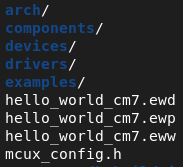
The standalone example feature supports repository examples and Freestanding examples using the explicitly include root CMakeLists.txt. Freestanding examples using McuxSDK CMake package do not have standalone example feature.
If your example already has generated build artifacts, you can directly type west build -t standalone_project to generate the standalone example.
Standalone examples for SysBuild projects#
For SysBuild projects, you can generate standalone versions for all the projects managed by sysbuild by appending the options --cmake-only -t standalone_project to the west build command. The generated project files are located in <build folder>/<project>/<toolchain>.
For example, the following command demonstrates how to generate standalone projects using the IAR toolchain for the hello_world multicore examples on the evkmimxrt1180 board:
west build -b evkmimxrt1180 --sysbuild examples/multicore_examples/hello_world/primary --config flexspi_nor_debug --toolchain=iar -Dcore_id=cm33 -p always --cmake-only -t standalone_project
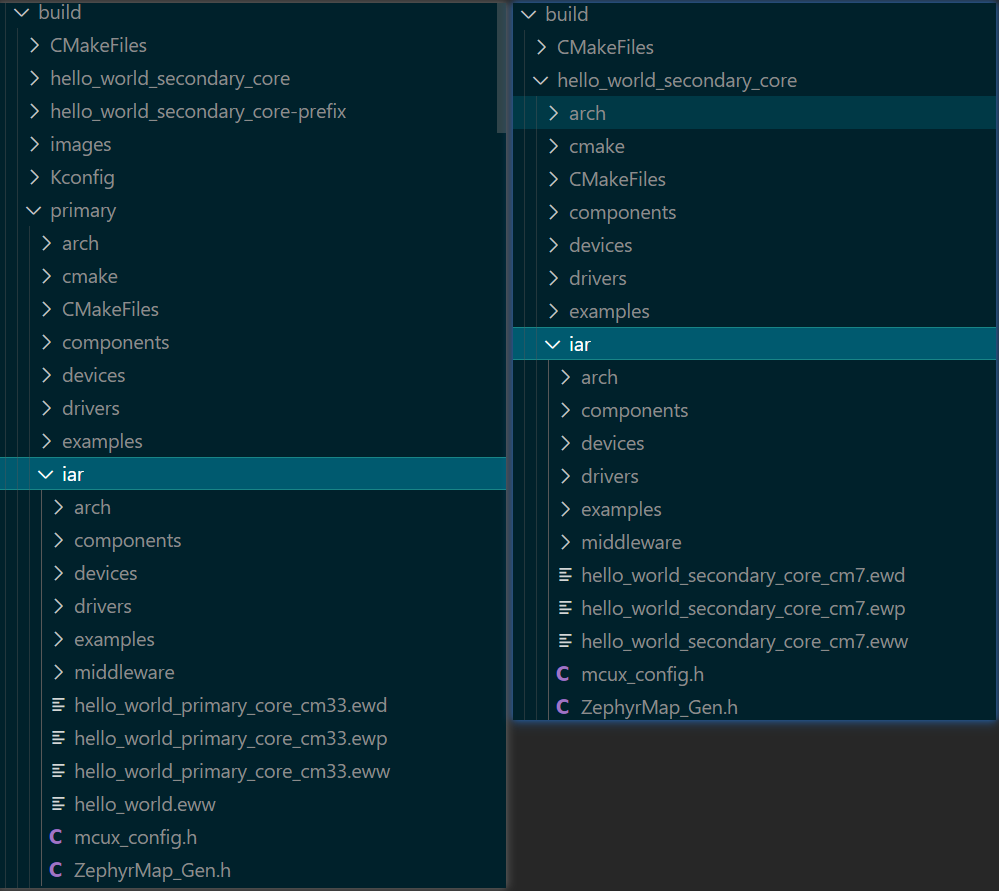
Note
For SysBuild projects, the most common scenario involves the main project linking to or including libraries or binaries generated by sub-projects.
For IDE-based projects such as those developed with IAR or Keil, the output libraries or binaries must be generated within the project’s build directory. To align with the expected behavior of these IDEs, copying or generating output files to directories outside the project build folder is not supported.
On the other hand, standalone projects require that all relevant files reside within the project directory structure. For paths located inside these directories, scripts can convert them into relative paths between projects. However, if a path points to a location outside the project directory, it cannot be translated in a consistent way across all standalone projects.
Example:
The object file secure_faults_trdc_s_CMSE_lib.o is generated in the parent directory of the project’s build folder. Since this location is outside the project build directory and not in the other project build directory, it is incompatible with the requirements of standalone projects. This should be corrected by placing the file within the appropriate project directory.

Convert a Repository Example to a Freestanding Example#
If you find one repository example functions are similar to your example and want to copy it from SDK repository into your own workspace as a Freestanding example to start the development, you can use west export_app command to do it. Take hello_world as an example:
west export_app examples/demo_apps/hello_world -o <new workspace>/hello_world
Then you can get output like this:
=== Successfully create the Freestanding project, see <new workspace>/hello_world/CMakeLists.txt.
=== you can use following command to build it.
west build -b <board_id> --toolchain armgcc -p always <new workspace>/hello_world -d <new workspace>/hello_world/build
Note
--build parameter makes the west export_app command to build the example after it is converted. It only works if the board or core_id are explicit arguments. (-Dcore_id=<core_id> is needed for multicore boards)
When the --build parameter is used, the west export_app extension accepts other parameters passed to west build.
Use case example:
west export_app -b <board_id> examples/demo_apps/hello_world -o <new workspace>/hello_world --build --toolchain armgcc --config release
For a non-SysBuild example, all files are generated to the output directory specified by -o. For SysBuild examples, it will keep the name of the last parent folder in the repo.
non-sysbuild example
    output_dir/
        ├── CMakeLists.txt
        └── main.c

sysbuild example
    output_dir/
        └── primary
            ├── CMakeLists.txt
            ├── main.c
            ├── sysbuild.cmake
        └── secondary
            ├── CMakeLists.txt
            ├── main.c
Technically, the Freestanding example generated by the above command can support any board.
If you want to specify the target board, you can use -b argument like
west export_app -b evkbmimxrt1170 examples/demo_apps/hello_world -Dcore_id=cm7 -o <new workspace>
Then you can use the following command to build
west build -b evkbmimxrt1170 --toolchain armgcc -p always <new workspace>/hello_world -d <new workspace>/hello_world/build -Dcore_id=cm7
Note
For Freestanding examples exported with explicit board or core_id, you can only build it with that board andcore_id.
How Export_App extension works#
west export_app extension uses a static cmake file parser to analyze the example’s CMakeLists.txt file. It will looks up all mcux_add_source and mcux_add_include in the list file and copy the recorded source/header files to the output directory.
For sysbuild examples, sysbuild.cmake is also involved to get the list file or linked application.
After copying all files, the paths in the list file will be updated to that in the output directory. It will also collected all example level prj.conf files and combine them into one.
When the user specifies the --bf option, the extension invokes the CMake configuration phase to generate trace logs and produce a final .config file. It then analyzes the output to determine which project segments and files the build uses. The --bf option enables the extension to parse the include function within the example’s CMakeLists.txt.
Hence, to ensure an SDK repository example can be successfully exported as a Freestanding example, it must comply with following rules:
Record files with mcuxsdk provided cmake extensions
mcux_add_source/mcux_add_include.Explicitly add common source files in the example’s
CMakeLists.txt. Do not add them inreconfig.cmakeor another cmake file.Do not add board related files like pin mux and clock config in example’s
CMakeLists.txt.Do not record duplicated source files in
reconfig.cmake.Do not record duplicated source files in
CMakelists.txtand project segments used in theprj.conf.For sysbuild examples,
ExternalMCUXProject_Addis expected in the rootsysbuild.cmakefile. For board with multiple different core ids, we only allow one levelinclude. That means, you canincludeanothersysbuild.cmakefile in your board folder, but you cannotincludeagain in that board specificsysbuild.cmake. Here is an example:# mcuxsdk/examples/dsp_examples/hello_world_usart/cm/sysbuild.cmake include(${SdkRootDirPath}/${board_root}/${board}/dsp_examples/hello_world_usart/${core_id}/sysbuild.cmake) # mcuxsdk/examples/_boards/mimxrt700evk/dsp_examples/hello_world_usart/cm33_core0/sysbuild.cmake ExternalZephyrProject_Add( APPLICATION hello_world_usart_hifi4 SOURCE_DIR ${APP_DIR}/../dsp board ${SB_CONFIG_dsp_board} core_id ${SB_CONFIG_primary_dsp_core_id} config ${SB_CONFIG_dsp_config} toolchain ${SB_CONFIG_dsp_toolchain} ) ExternalMCUXProject_Add( APPLICATION hello_world_usart_hifi1 SOURCE_DIR ${APP_DIR}/../dsp board ${SB_CONFIG_dsp_board} core_id ${SB_CONFIG_secondary_dsp_core_id} config ${SB_CONFIG_dsp_config} toolchain ${SB_CONFIG_dsp_toolchain} ) ExternalZephyrProject_Add( APPLICATION hello_world_usart_cm33_core1 SOURCE_DIR ${APP_DIR}/../cm_core1 board ${SB_CONFIG_secondary_board} core_id ${SB_CONFIG_secondary_core_id} config ${SB_CONFIG_secondary_config} toolchain ${SB_CONFIG_secondary_toolchain} ) # Let's build the hifi4 application first add_dependencies(hello_world_usart_cm33_core1 hello_world_usart_hifi1) add_dependencies(${DEFAULT_IMAGE} hello_world_usart_hifi4) add_dependencies(${DEFAULT_IMAGE} hello_world_usart_cm33_core1)
Additionally, the extension now supports:
Copying extra files or folders defined in the example metadata, with
extra_filesfield. This can support setting custom destination paths for those copied files.Applying simple replacements to update paths or values in exported files.
These enhancements make it easier to customize and adapt examples during export. For example you can define in the example.yml :
hello_world_virtual_com:
  section-type: application
  contents:
    # hello_world_virtual_com content
    extra_files:
      - source: ${SdkRootDirPath}/examples/_boards/${board}/demo_apps/hello_world_virtual_com/reconfig.cmake
      - destination: reconfig.cmake
    replacements:
      - file: CMakeLists.txt
        replace:
          - from: "include(${SdkRootDirPath}/${board_root}/${board}/demo_apps/hello_world_virtual_com/reconfig.cmake OPTIONAL)"
            to: "include(${CMAKE_CURRENT_SOURCE_DIR}/reconfig.cmake OPTIONAL)"
In this example, this will:
Copy the example’s
reconfig.cmakeunder the Freestanding folder to be customized.Update the CMakeLists.txt to reflect the new path.
Known Issues of Export_App#
As mentioned in How Export_App extension works, the extension is only abled to process files into mcux_add_source and mcux_add_include in all scenarios and include under --bf. Any remove logic like mcux_project_remove_source will be bypassed. That brings no effect to build, but may introduce useless files in output directory.
Example with different build configurations#
An example may have different build configuration(usually for test), see prj.conf. It is easy for a developer to add different configurations in example.ymlto make it visable to list_project and build extension.
Here is an example:
# examples/demo_apps/hello_world/example.yml+

hello_world:
  hello world content
# The example with custom configuration must end with '@config_name'
hello_world@custom1:
  section-type: custom_application # MUST BE custom_application
  contents:
    document:
      extra_build_args:
      - -DCONF_FILE=examples/demo_apps/hello_world/new.conf
  boards:
    # define your scope for this custom_application
Note
Currently, custom_application only support contents -> document -> extra_build_args, do not add other fields.
Component Configuration in Project Construction and Build#
The following ways can be used to do component configuration in a project construction and build
Use Kconfig to do configuration for the component set
Use the prepared customized configuration header file for the component set in the example root
Use the default provided configuration header file for the component in the component folder
Note
For a component, it must be defined in Kconfig, otherwise the component won’t be added into the build tree. It is not required that component Kconfig items must have concrete configurations. You can still add configurations by using macro definitions in the header file.
To make the above ways coexist in a component set, a component set(especially middleware components) shall follow these steps:
Prepare a
configcomponent to hold the default configuration file for the component set.configcomponent means the component files shall be marked withCONFIG: TRUE, and if the config file is a header file, the include path shall useTARGET_FILESto identify the file that corresponds to the path. Theconfigheader file has lowest priority in the build system, if any same name header file is provided in the example root, then it won’t be included. Thisconfigcomponent shall be selected by the core component of the component set, then it can always be selected. So if the customized configuration is not provided for that component, the project can still build with default configuration provided byconfigcomponent.Prepare a project segment in Kconfig file to hold all Kconfig configuration symbols for the component set. All the configuration symbols shall be set to be generated into a designated header file with the same name as component default configuration file.
If you want to use Kconfig to do configuration, then the project segment should be set to y. The generated configuration header name must be set in Kconfig to be the same as the default component configuration header file. This overrides the component’s default header file.
The project segment can depend on the core component of the component set.
If you don’t want to use Kconfig but prefer to directly provide a configuration header, then the project segment should be set to n, the directly provided configuration header shall be put in the root of project.
Create an Example#
Firstly, you should make sure that the target device and board data are ready, secondly, you need to follow the above CMakeLists.txt, Kconfig, prj.conf and example.yml chapters to prepare the build and configuration files, then it should be ok.
If the default board and device data and configuration cannot satisfy your needs, then you need to do customization for the certain device or board or both.
There are following ways to do the customization.
Reconfig CMake
In the example CMakeLists.txt, there is such line
include(${SdkRootDirPath}/${board_root}/${board}/demo_apps/hello_world/reconfig.cmake OPTIONAL)
This is the board port cmake. Any board specific configurations can be added in it.
prj.conf
For component selection and configuration, you can use different scope prj.conf to achieve it. Refer the priority of prj.conf in prj.conf chapter to set the data.
Multi-Project Examples#
Some examples consist of multiple cooperating sub-projects that must be built together. For example, a primary core plus one or more secondary cores in a multicore design, or a secure plus non-secure pair on a TrustZone-capable device. The MCUXpresso SDK uses Sysbuild for the full sysbuild reference to orchestrate these multi-project examples. One project acts as the entry point, owns the sysbuild configuration, and registers its sibling sub-projects via ExternalMCUXProject_Add.
Directory Layout#
A typical multi-project example includes the following:
examples/<category>/<example_name>/
├── <main_project>/                   ← sysbuild entry point
│   ├── CMakeLists.txt
│   ├── prj.conf
│   ├── sysbuild.cmake                ← register sub-projects
│   ├── Kconfig.sysbuild              ← (optional) propagate parameters to sub-projects
│   └── sysbuild/
│       └── <sub_project>.conf        ← (optional) sysbuild-scope config per sub-project
└── <sub_project>/
    ├── CMakeLists.txt
    └── prj.conf
The main project is the one passed to west build --sysbuild; it drives the entire build.
Required Files in the Main Project#
1. sysbuild.cmake — registers each sub-project and declares a build-order dependency. Use ExternalMCUXProject_Add:
ExternalMCUXProject_Add(
    APPLICATION <sub_project_name>
    SOURCE_DIR  ${APP_DIR}/../<sub_project_folder>
    board       ${SB_CONFIG_secondary_board}
    core_id     ${SB_CONFIG_secondary_core_id}
    config      ${SB_CONFIG_secondary_config}
    toolchain   ${SB_CONFIG_secondary_toolchain}
)

# Build the sub-project before the main project
add_dependencies(${DEFAULT_IMAGE} <sub_project_name>)
2. Kconfig.sysbuild — needed when a sub-project’s parameters (board, core_id, toolchain, build config) must be derived from, but differ from, the values passed on the command line. The classic case is a secondary core whose core_id differs from the primary core:
config secondary_core_id
    string
    default "cm4"        if $(board) = "evkbmimxrt1170" && $(core_id) = "cm7"
    default "cm33_core1" if $(board) = "lpcxpresso55s69" && $(core_id) = "cm33_core0"

config secondary_toolchain
    string
    default "$(toolchain)"
Note
If every sub-project shares the same core_id as the main project (for example, a TrustZone secure / non-secure pair running on the same core), Kconfig.sysbuild is not required — pass core_id ${core_id} directly to ExternalMCUXProject_Add. As soon as a sub-project needs a different core_id, you must introduce Kconfig.sysbuild to map the value.
3. sysbuild/<project>.conf (optional) — its file name must match the project identifier given by the sub-project’s project() call. These conf files are sysbuild-scoped and override the sub-project’s local prj.conf.
Linking Sub-Project Outputs into the Main Image#
There are two common patterns in the SDK, distinguished by what the sub-project produces and how the main project consumes it.
Pattern A — Embed a binary (multicore example).
The sub-project converts its ELF to a raw .bin; the main project embeds that .bin into its own image at link time. The technique used in the main project is toolchain-specific.
In the sub-project’s CMakeLists.txt:
mcux_convert_binary(
    TOOLCHAINS armgcc mdk iar
    BINARY ${APPLICATION_BINARY_DIR}/${CONFIG_TOOLCHAIN}/core1_image.bin
)
In the main project’s CMakeLists.txt:
# IAR — the linker natively embeds a raw .bin via --image_input
mcux_add_iar_configuration(
    LD "--image_input=${APPLICATION_BINARY_DIR}/../<sub>/iar/core1_image.bin,_core1_image,__core1_image,4 \
        --keep _core1_image"
)

# ARM GCC / MDK — embed the .bin via the SDK utility component fsl_incbin.S
# (assembler-level `.incbin` / `INCBIN` directive). The include path below lets
# fsl_incbin.S locate the secondary's core1_image.bin at assembly time.
mcux_add_include(
    TOOLCHAINS mdk armgcc
    BASE_PATH ${APPLICATION_BINARY_DIR}
    INCLUDES ../<sub>/${CONFIG_TOOLCHAIN}/
)

mcux_add_mdk_configuration(
    LD "--keep=*(*core1_code)"
)

mcux_add_configuration(
        CC "-DCORE1_IMAGE_COPY_TO_RAM"
)
For ARM GCC and MDK, the main project enables the incbin utility in its prj.conf so that the helper assembly file is added to the build:
CONFIG_MCUX_COMPONENT_utility.incbin=y
The component, located at components/misc_utilities/fsl_incbin.S, uses the assembler’s .incbin (GAS) / INCBIN (armasm) directive to embed the raw .bin into a dedicated section (.core1_code for GCC, core1_code AREA for MDK).
For ARM GCC, fsl_incbin.S itself exports the symbols core1_image_start, core1_image_end, and core1_image_size; the board port’s app.h simply re-declares them, e.g. extern const char core1_image_start[];, and the standard SDK linker script places the section in flash.
For MDK, fsl_incbin.S only deposits the bytes into the core1_code AREA; the scatter file maps that AREA into an execution region named CORE1_REGION, and --keep=*(*core1_code) prevents the linker from stripping it. The board port’s app.h then uses the scatter-file-generated symbols, e.g.
extern uint32_t Image$$CORE1_REGION$$Base;
extern uint32_t Image$$CORE1_REGION$$Length;
At runtime, with CORE1_IMAGE_COPY_TO_RAM defined, the main core copies the embedded image to the secondary core’s RAM and releases the secondary core from reset. The result is a single flashed image containing both cores’ code.
Note
IAR does not use fsl_incbin.S — the IAR linker natively embeds a raw binary via --image_input, so no assembler helper is needed. fsl_incbin.S is built only for ARM GCC and MDK.
A real example using this pattern is at examples/multicore_examples/hello_world.
Pattern B — Link a CMSE veneer object (TrustZone example).
The secure sub-project produces a CMSE veneer object file, which the main (non‑secure) project links as a standard library. All three toolchains produce the same artifact (*_CMSE_lib.o); only the flags used to generate it differ.
In the secure sub-project’s CMakeLists.txt:
mcux_add_iar_configuration(
    CC "--cmse"  CX "--cmse"
    LD "--import_cmse_lib_out=${APPLICATION_BINARY_DIR}/${CONFIG_TOOLCHAIN}/<s_app>_CMSE_lib.o"
)
mcux_add_armgcc_configuration(
    AS "-mcmse" CC "-mcmse" CX "-mcmse"
    LD "-Wl,--cmse-implib -Wl,--out-implib=${APPLICATION_BINARY_DIR}/${CONFIG_TOOLCHAIN}/<s_app>_CMSE_lib.o"
)
mcux_add_mdk_configuration(
    AS "-mcmse" CC "-mcmse" CX "-mcmse"
    LD "--import-cmse-lib-out=${APPLICATION_BINARY_DIR}/${CONFIG_TOOLCHAIN}/<s_app>_CMSE_lib.o"
)
In the non-secure (main) project’s CMakeLists.txt:
mcux_add_library(
    BASE_PATH ${APPLICATION_BINARY_DIR}
    LIBS "../<s_app>/${CONFIG_TOOLCHAIN}/<s_app>_CMSE_lib.o"
    TOOLCHAINS armgcc mdk iar
    GENERATED TRUE
)
The two sides are produced as two independent images flashed to separate memory regions; they communicate at runtime through Secure Gateway (SG) instructions, not through binary embedding.
A real example using this pattern is at examples/trustzone_examples/hello_world_ns (the non-secure side is the sysbuild entry point) together with examples/trustzone_examples/hello_world_s.
Customizing the Linker Scripts#
The default linker scripts are under devices/<soc_portfolio>/<soc_series>/<device>/{gcc,iar,arm}. Each project has its own board-port reconfig.cmake at examples/_boards/<board>/<category>/<example_name>/reconfig.cmake. Update its default linker script there using the mcux_remove_<toolchain>_linker_script and mcux_add_<toolchain>_linker_script. What is specific to multi-project setups is that the two scripts must agree on the memory split.
For Pattern A (multicore), the primary script reserves a section — conventionally m_core1_code / .core1_code — sized to hold the embedded secondary binary, and the secondary script places its code at the run-time address the primary copies the image to:
/* primary *.ld — reserve a region for the embedded secondary .bin */
MEMORY {
    m_text       (RX) : ORIGIN = 0x30000400, LENGTH = 0x000FFC00
    m_core1_code (RX) : ORIGIN = 0x30100000, LENGTH = 0x00100000
}
SECTIONS { .core1_code : { KEEP(*(.core1_code)) } > m_core1_code }
For Pattern B (TrustZone), the secure side uses *_flash_s.{ld,icf,scf} and the non-secure side uses *_flash_ns.{ld,icf,scf}.
For both patterns, only update linker scripts setting in reconfig.cmake when the board needs a non-default memory map. For example:
mcux_remove_armgcc_linker_script(
    TARGETS debug release
    BASE_PATH ${SdkRootDirPath}
    LINKER ${device_root}/${soc_portfolio}/${soc_series}/${device}/gcc/${CONFIG_MCUX_TOOLCHAIN_LINKER_DEVICE_PREFIX}_flash.ld
)
mcux_add_armgcc_linker_script(
    TARGETS debug release
    BASE_PATH ${SdkRootDirPath}
    LINKER ${device_root}/${soc_portfolio}/${soc_series}/${device}/gcc/${CONFIG_MCUX_TOOLCHAIN_LINKER_DEVICE_PREFIX}_flash_ns.ld
)
Build the Example#
Run west build -h to see help information for west build command.
Compared to zephyr’s west build, MCUXpresso SDK build command provides following additional options for examples:
--toolchain: specify the toolchain for this build, default armgcc.--config: value for CMAKE_BUILD_TYPE, default debug.
Here are some typical usage for generating a SDK example is:
# Build example
west build -b frdmk22f examples/demo_apps/hello_world
# multcore device must be specified with core_id
west build -b evkbmimxrt1170 examples/demo_apps/hello_world -Dcore_id=cm7

# Just print cmake commands, do not execute it
west build -b evkbmimxrt1170 examples/demo_apps/hello_world -Dcore_id=cm7 --dry-run

# Build iar
west build -b evkbmimxrt1170 examples/demo_apps/hello_world -Dcore_id=cm7 --toolchain iar

# Build flexspi_nor_debug target
west build -b evkbmimxrt1170 examples/demo_apps/hello_world -Dcore_id=cm7 --config flexspi_nor_debug

# Switch device
west build -b frdmk22f examples/demo_apps/hello_world --device MK22F12810
west build -b evkbmimxrt1170 examples/demo_apps/hello_world --device=MIMXRT1175 -Dcore_id=cm7 --config flexspi_nor_debug
For shield, please use the --shield to specify the shield to build, like
west build -b mimxrt700evk --shield a8974 examples examples/issdk_examples/sensors/fxls8974cf/fxls8974cf_poll -Dcore_id=cm33_core0
If you want to get available commands for different build config combinations supported by the example and the toolchain, you can run the command below. Please note that @${core_id} suffix for board is only needed for multicore devices.
west list_project -p examples/mbedtls_examples/mbedtls_selftest -b evkbmimxrt1170@cm7 -t mdk
Here is the output:
INFO: [   1][west build -p always examples/mbedtls_examples/mbedtls_selftest --toolchain mdk --config debug -b evkbmimxrt1170 -Dcore_id=cm7]
INFO: [   2][west build -p always examples/mbedtls_examples/mbedtls_selftest --toolchain mdk --config flexspi_nor_debug -b evkbmimxrt1170 -Dcore_id=cm7]
INFO: [   3][west build -p always examples/mbedtls_examples/mbedtls_selftest --toolchain mdk --config flexspi_nor_release -b evkbmimxrt1170 -Dcore_id=cm7]
INFO: [   4][west build -p always examples/mbedtls_examples/mbedtls_selftest --toolchain mdk --config release -b evkbmimxrt1170 -Dcore_id=cm7]
INFO: [   5][west build -p always examples/mbedtls_examples/mbedtls_selftest --toolchain mdk --config sdram_debug -b evkbmimxrt1170 -Dcore_id=cm7]
INFO: [   6][west build -p always examples/mbedtls_examples/mbedtls_selftest --toolchain mdk --config sdram_release -b evkbmimxrt1170 -Dcore_id=cm7]
Tip
You can use west config list_project.list_format silent_cmd to remove useless log wrapper of the list_project output. It will directly output the build command west build -p always examples/mbedtls_examples/mbedtls_selftest --toolchain mdk --config debug -b evkbmimxrt1170 -Dcore_id=cm7
For multi-projects example build, you can build all projects by adding --sysbuild for main project. For example:
west build -b evkbmimxrt1170 --sysbuild ./examples/multicore_examples/hello_world/primary -Dcore_id=cm7 --config flexspi_nor_debug -p always
For more details, please refer to System build.
Flash and Debug The Example#
Flash#
For an example that have been compiled successfully, use the command to flash the image:
west flash
To specify the build directory, use --build-dir (or -d).
Debug#
Here are the typical supported debugger servers:
Please install LinkServer or JLink and add it to PATH environment variable firstly, then specify debug server with -r.
If you want to configure debug server, please refer to Flash and Debug Data.
Flash the hello_world example:
west flash -r linkserver
Start a gdb interface by following command:
west debug -r linkserver
All of the above west commands can only be run in mcuxsdk west workspace. If you want to use them outside the workspace, please run
mcuxsdk/mcux-env.cmdin Windows Command Prompt orsource mcuxsdk/mcux-env.shin Linux terminal to activate the commands.
Flash and Debug CMake Configuration Data#
MCUXpresso SDK supports to set up customized configuration for board flash runners. Such configuration is stored in ${SdkRootDirPath}/examples/_boards/<board>/board_runner.cmake. It is loaded by ${SdkRootDirPath}/cmake/extension/run.cmake which is used to get runner type and arguments.
Here is an example:
# set runner speicfic arguments
board_runner_args(jlink "--device=${CONFIG_MCUX_TOOLCHAIN_JLINK_CPU_IDENTIFIER}")
board_runner_args(linkserver "--device=${CONFIG_MCUX_HW_DEVICE_ID}:MIMXRT1170-EVKB")
board_runner_args(linkserver "--core=${core_id}")

# load board supported runner cmake file
include(${SdkRootDirPath}/cmake/extension/runner/jlink.board.cmake)
include(${SdkRootDirPath}/cmake/extension/runner/linkserver.board.cmake)
In this example, board_runner_args is used to pass runner-specific arguments, runner cmake files are load from ${SdkRootDirPath}/cmake/extension/runner/ which indicates the supported runners.
The first included runner cmake will be set as the default runner for both flash and debug.
If you want to choose a different runner, you can set following variables in the board variable.cmake:
mcux_set_variable(BOARD_FLASH_RUNNER "linkserver")
mcux_set_variable(BOARD_DEBUG_RUNNER "jlink")
To make the runner get correct flash address, the Kconfig option FLASH_BASE_ADDRESS shall be set correct value for each device core in devices/${soc_portfolio}/${soc_series}/${device}/(${core_id})/prj.conf:
CONFIG_FLASH_BASE_ADDRESS=0x30000400
If your example has different flash base address, please override the above value in your example specific prj.conf.
Size Report of the generated ELF#
Run west build -t ram_report or west build -t rom_report
Sample for ram size report:
Path                                                                                             Size       %  Address    Section
==========================================================================================================================================
Root                                                                                             3264 100.00%  -
├── (hidden)                                                                                     3107  95.19%  -
├── (no paths)                                                                                     28   0.86%  -
│   ├── SystemCoreClock                                                                             4   0.12%  0x20000000 .data
│   ├── s_lpuartHandle                                                                             12   0.37%  0x20000084 .bss
│   └── s_lpuartIsr                                                                                12   0.37%  0x20000090 .bss
├── /                                                                                              96   2.94%  -
│   └── Volumes                                                                                    96   2.94%  -
│       └── data                                                                                   96   2.94%  -
│           └── jenkins                                                                            96   2.94%  -
│               └── workspace                                                                      96   2.94%  -
│                   └── GNU-toolchain                                                              96   2.94%  -
│                       └── arm-11                                                                 96   2.94%  -
│                           └── src                                                                96   2.94%  -
│                               └── newlib-cygwin                                                  96   2.94%  -
│                                   └── newlib                                                     96   2.94%  -
│                                       └── libc                                                   96   2.94%  -
│                                           └── reent                                              96   2.94%  -
│                                               └── impure.c                                       96   2.94%  -
│                                                   └── impure_data                                96   2.94%  0x20000008 .data
└── SDK_BASE                                                                                       33   1.01%  -
    ├── components                                                                                 20   0.61%  -
    │   └── debug_console_lite                                                                     20   0.61%  -
    │       └── fsl_debug_console.c                                                                20   0.61%  -
    │           └── s_debugConsole                                                                 20   0.61%  0x200000a4 .bss
    ├── devices                                                                                     4   0.12%  -
    │   └── MCX                                                                                     4   0.12%  -
    │       └── MCXA                                                                                4   0.12%  -
    │           └── MCXA153                                                                         4   0.12%  -
    │               └── drivers                                                                     4   0.12%  -
    │                   └── fsl_clock.c                                                             4   0.12%  -
    │                       └── s_Ext_Clk_Freq                                                      4   0.12%  0x20000004 .data
    ├── drivers                                                                                     8   0.25%  -
    │   └── ostimer                                                                                 8   0.25%  -
    │       └── fsl_ostimer.c                                                                       8   0.25%  -
    │           ├── s_ostimerHandle                                                                 4   0.12%  0x2000009c .bss
    │           └── s_ostimerIsr                                                                    4   0.12%  0x200000a0 .bss
    └── examples                                                                                    1   0.03%  -
        └── driver_examples                                                                         1   0.03%  -
            └── ostimer                                                                             1   0.03%  -
                └── ostimer_example.c                                                               1   0.03%  -
                    └── matchFlag                                                                   1   0.03%  0x200000b8 .bss
==========================================================================================================================================
                                                                                                 3264
To get JSON RAM/ROM usage report in build directory, just run west build -t footprint
Usage for Cmake Targets#
To see all accessible cmake targets, run west build -t usage, then you can get a more readable help information
Cleaning targets:
  clean     - Remove most generated files but keep configuration and backup files
  pristine  - Remove all files in the build directory

Kconfig targets:
  menuconfig - Update .config using a console-based interface
  guiconfig  - Update .config using a graphical interface

Other generic targets:
  all          - Build a mcuxsdk application
  run          - Build a mcuxsdk application and run it if the board supports emulation
  flash        - Run "west flash"
  debug        - Run "west debug"
  ....
  other targets
Project Segment#
MCUXpresso SDK is composed of hundreds of devices and boards, thousands of components and ten thousands of examples. Examples on the devices and boards have many shared data like core related settings, common build target settings, device headers and configurations, board files, clock and pin mux. Project segment data section is an abstraction of common shared project data. It is introduced to avoid data duplication.
CMake#
Like the component, in cmake files, project segment data shall be recorded inside a if-endif guard. The if condition shall be with prefix CONFIG_MCUX_PRJSEG_, right after it is the project segment name.
Here is one project segment cmake example:
if (CONFIG_MCUX_PRJSEG_module.board.clock)  # project segment name is module.board.clock
    # project segment data
    mcux_add_source(
        BASE_PATH ${SdkRootDirPath}
        SOURCES boards/${board}/clock_config.h
                boards/${board}/clock_config.c
    )
    mcux_add_include(
        BASE_PATH ${SdkRootDirPath}
        INCLUDES boards/${board}
    )
endif()
Kconfig#
In Kconfig, symbol for a project segment shall start with MCUX_PRJSEG_ to be identical with cmake project segment name. Project segment configuration and dependency shall be recorded following the below pattern:
config MCUX_PRJSEG_module.board.clock
    bool "Use default clock files"
    imply MCUX_COMPONENT_driver.clock
    if MCUX_PRJSEG_module.board.clock
    endif
Unlike the component dependency, the dependency for project segment is simple, just several parallel imply to state that the project segment depends on some components and maybe other project segment to work. Since it is frequently occuring cases that some examples on certain boards need to modify some predefined project segment dependencies, please use imply instead of select for project segment dependencies because select once is set to true then cannot be deselected anymore.
Predefined Project Segments#
There are already many project segments defined in mcuxsdk, here is the frequently used project segments table.
Location |
Functionality |
|---|---|
arch |
The predefined settings and configurations of different SOC architectures |
examples/_common |
Commonly shared example board modules like board file, pinmux, clock config, etc. |