
MCUXpresso Software Development Kit (SDK)#
The MCUXpresso SDK is a comprehensive software enablement package designed to simplify and accelerate application development with Arm® Cortex®-M based devices from NXP, including its general purpose, crossover and wireless-enabled MCUs. It includes production-grade software with integrated enabling software technologies (stacks and middleware), reference examples, and more.
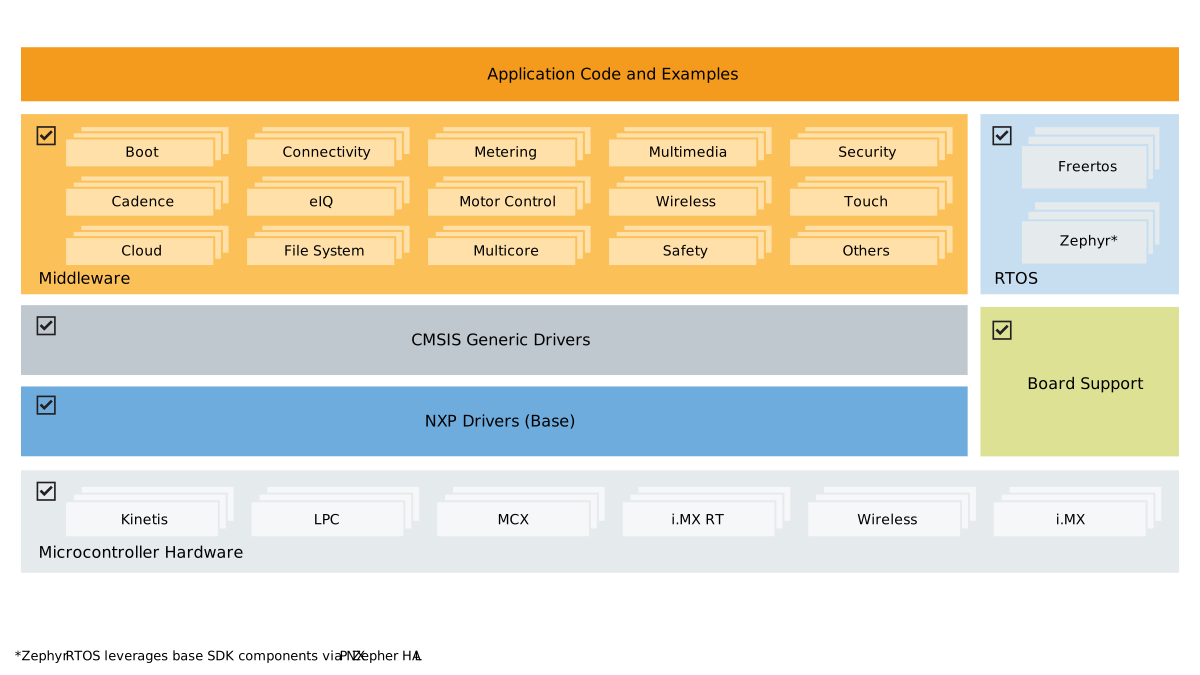
Features#
Comprehensive Driver Library#
Flexible peripheral drivers for rapid development
Optimized for performance and code size
RTOS Integration#
FreeRTOS support with optimized configurations
Real-time application frameworks
Task management and scheduling examples
Middleware Components#
Connectivity stacks (USB, Ethernet, wireless, communication protocols)
AI inference engines and neural network libraries
Audio processing and voice recognition libraries
Security frameworks and cryptographic libraries
Graphics and user interface components
Motor control and real-time control libraries
File systems and storage solutions
Partner middleware can be added using CMake and west manifests
Extensive Examples#
Basic peripheral use cases to full technology demonstrations
Board-specific reference implementations
Out-of-box Demo Applications
Middleware component examples and integrations
Distribution Formats#
MCUXpresso SDK is available in two main formats:
GitHub Repository SDK#
Git-based distribution hosted on GitHub for modular development, continuous updates, and collaborative workflows. The SDK uses multiple repositories managed by the Zephyr west tool to provide flexible, component-based development. See Getting Started for setup instructions.
SDK Package#
Downloadable packages from SDK Builder for offline development. Starting with release 25.12.00, two package versions are available:
Classic SDK Package: Traditional board-specific packages with pre-configured IDE projects for MCUXpresso IDE, IAR, Keil, and other toolchains.
Repository-Layout SDK Package: Board-specific packages that maintain the same structure and build system as the GitHub Repository SDK, providing offline access to the repository-based development experience. Available when selecting the ARMGCC toolchain.
Note
From version 25.12.00 onward, selecting ARMGCC downloads the Repository-Layout version; all other toolchains remain in the Classic version.
Delivery and Release#
NXP integrates Coverity® Static Analysis and Black Duck Software Composition Analysis into the SDK development process to deliver secure, high-quality software.
Annual releases (June) for popular products, with Long Term Support (LTS) on GitHub — back-ported security (SVE/PSIRT) and severe bug fixes for two years.
Quarterly releases for NPI and recent products.
SBOMs provided for all GitHub SDK repositories.
Release |
Release Name |
Maintenance |
|---|---|---|
LTS |
26.06.00-LTS |
2 years until June 2028 |
Quarterly |
26.09.00 |
None, rebase to mainline |
LTS |
27.06.00-LTS |
2 years until June 2029 |
Supported platforms are listed at mcuxpresso.nxp.com/sdk-versions.
Toolchain Support#
All driver examples and most application examples are provided for the following toolchains:
Toolchain |
GitHub |
Archive/Zip |
Generated (west) |
Getting Started |
|---|---|---|---|---|
MCUXpresso IDE |
❌ |
✅ eclipse |
❌ |
|
MCUXpresso for VS Code |
✅ |
✅ CMake |
N.A. |
|
IAR Embedded Workbench |
✅ |
✅ EWARM |
✅ EWARM |
|
Keil™ MDK-Arm |
❌ |
✅ uVision |
✅ uVision |
|
CLI GNU toolchain |
✅ |
✅ CMake |
N.A. |
Archive/Zip packages can be downloaded from SDK Builder or imported directly in VS Code and MCUXpresso IDE using the Import Wizard.
IAR and Keil projects can be generated from the GitHub SDK CMake examples using a west build command.
Repository Architecture#
The SDK uses a multi-repository structure on GitHub managed by the Zephyr West Tool, enabling:
Modular Organization: Drivers, RTOS, middleware, and examples in separate repositories
Customizable Manifests: Targeted setups for specific requirements
Selective Downloads: Include only needed components
Independent Updates: Component-level version control
Scalable Integration: Easy addition of new repository components
Support and Resources#
Community Support#
Open GitHub issues and discussions for questions and contributions
Documentation#
Comprehensive guides and API documentation online
Technical Support#
NXP Support for commercial development assistance