
Running wireless ranging demo application#
This chapter provides information on how to run wireless application.
Using the console#
Choose this option if you want to perform simple non-automated measurements without invoking any ranging algorithm.
If you want to run hosted algorithms or automated series of measurements, the host application is a better choice. See the following chapters for more detail.
Configuring the ranging service client#
Connect to the board that acts as the ranging service client (the board that initiates the measurement request) using a serial console (see Firmware setup).
Run the following command:
communication role {central | peripheral}
Parent topic:Using the console
Triggering one CS measurement#
First, ensure that you have configured the ranging service server and ranging service client boards as described above.
To trigger a measurement, run the following command:
range
Both devices synchronize to each other and perform a CS test procedure using default settings.
The expected output is a JSON-like structure similar to the following:
items:[{mciq:{cfg:{n_ap:1,n_stp:79},result:{vf:79,cde:8.76,cqi:1.000},},tof:{cfg:{n_stp:13},result:{ad:7.8,sr:100},},},]
CRC32:cf49a670
marker:[DONE]
If verbosity is increased, the output may contain numerous additional information. It may contain all CS results output as well as debug information.
See section Command response for how to interpret these results.
Parent topic:Using the console
Changing CS configuration#
The console configures numerous CS parameters.
See Embedded firmware command reference for the exhaustive firmware configuration commands that can be passed through the command line interface (CLI).
Parent topic:Using the console
Parent topic:Running wireless ranging demo application
Using Python host application#
Using Python application to trigger CS measurements is the preferred option. It takes care of automatically interpreting the CS results, passing them into the selected algorithm, and presenting the output in user-friendly formats.
At this stage, we assume that the setup is properly connected and firmware and host application have been properly installed and configured.
Note: Be sure that you have configured the ranging service server board as Bluetooth Low Energy peripheral, as described above.
The application is in the form of a Python script located in: <app_folder>\python\Scripts\record_range_measurement.py.
To check that everything is installed properly, enter:
python record_range_measurement.py --help
It should display command usage. If any Python issue shows up, revisit the installation section.
Application parameters#
The --help option provides most of the explanation regarding command-line options.
See additional information below:
The application attempts to detect boards automatically. However, it is possible to force which COM port to connect to using
--comportoption.By default, the application attempts to detect two boards: one acts as a client, and another one acts as the server. Using
-Roption allows you to run the application with a single board (client) connected to the PC. Once the client is configured, it can be moved freely without being connected to the PC, as shown in the figure.The client always acts as the Bluetooth Low Energy central role. Additionally, by default, the client acts as the CS initiator (CS role can be changed using
--roleoption).The application prints results on the screen. However, using
--targetoption (can be specified multiple times), it is also possible to generate output files in the following formats:Text file (*.txt) that contains only the raw data exchanged between firmware and Python script.
Numpy format (*.npz) that can be loaded using Python numpy library. It contains both raw data and results of distance estimations.
Matlab format (*.mat) that can be loaded directly into Matlab. It contains both raw data and results of distance estimations.
CSV file (*.csv) that contains distance estimation results dumped for each measurement.
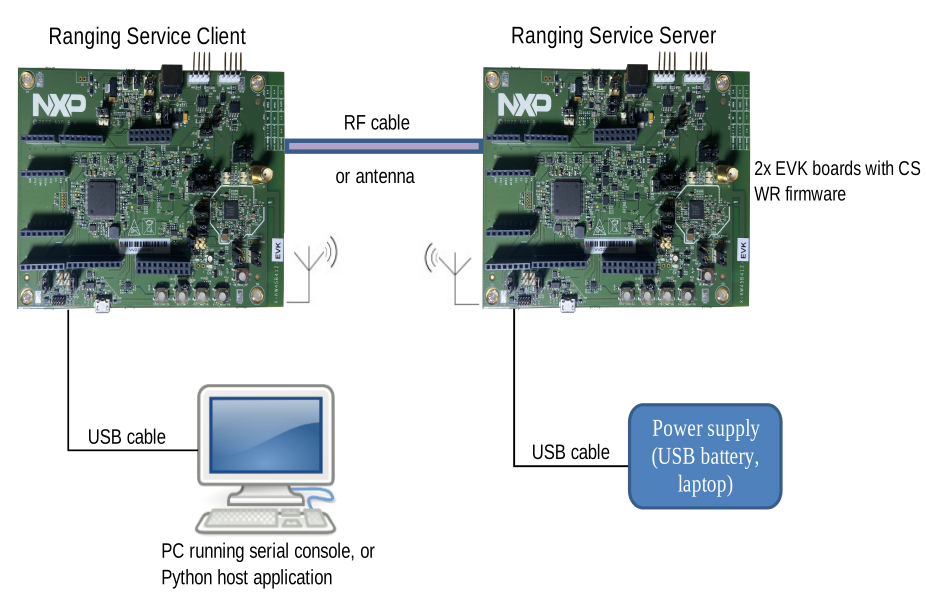
Parent topic:Using Python host application
Performing CS measurements with only step mode 2’s#
The following command triggers a series of 5 CS measurements using RTP:
python record_range_measurement.py --mainmode 2 -n 5
The above command uses default CS parameters configured in the firmware.
To change some parameters, --dutconfig arguments can be added to the command.
For example to select 2 Mbit/s PHY, use:
--dutconfig "param rtt_phy 1"
To enable antenna diversity 2x2 with SMA connectors from antenna diversity board, use:
--dutconfig "param ant 7" --dutconfig "param ant_type 1" --dutconfig "param timings t_sw 2"
See Embedded firmware command reference for the exhaustive firmware configuration commands that can be passed through the --dutconfig option.
The output of the script shows:
Several miscellaneous information, such as serial ports used, configuration, and so on:
2024-12-04 10:44:40 [INFO] __main__: Working on win32
2024-12-04 10:44:40 [INFO] ranging_platform_pkg.utils: Configuring RangingPlatform_kw45 as peer on port: COM26 with unique_id: 0x000000000000
2024-12-04 10:44:41 [INFO] ranging_platform_pkg.utils: Configuring RangingPlatform_kw45 as dut on port: COM27 with unique_id: 0x000000000000
2024-12-04 10:44:43 [INFO] ranging_platform_pkg.utils: Starting measurement with 1 parameters and 5 measurements
2024-12-04 10:44:43 [INFO] ranging_platform_pkg.utils: COM27:   central initiator
A series of measurements returning estimated distance, initiator RSSI, reflector RSSI, and measurement duration:
Measurements statistics (average and standard deviation):
==============Measurement stats ======================
Results for board pair (1, 1):
RTP: avg=0.29, stdev=0.00, min=0.29, max=0.29
RADE: avg=0.29, stdev=0.00, min=0.29, max=0.29
======================================================
Depending on the --target option selected, different output files are generated in <app_folder>\python\Scripts\records\ folder.
Parent topic:Using Python host application
Performing distance estimation using mode 2’s as main mode and mode 1 as submode#
The following command triggers a series of 5 CS measurements using RTP/RTT:
python record_range_measurement.py --mainmode 2 --submode 1 -n5
Expected output is as follows where SRDE and RTT distance are computed:
2021-11-18 09:49:05 [INFO] record_range_measurement: ===========================================================
2021-11-18 09:49:05 [INFO] ranging_platform_pkg.utils: - parameter0 - meas_nr has 5 values
2021-11-18 09:49:05 [INFO] ranging_platform_pkg.utils: Iteration -    0/5    @(meas_nr = 00) => RTP/RTT-distance = 12.47m/13.56m (100%), RSSI = -33dBm/-47dBm, Duration = 335ms
Parent topic:Using Python host application
Configuring embedded algorithms#
The following command triggers CS measurements using the embedded CDE + RADE algorithms and RTP/RTT with minimal verbosity output:
python record_range_measurement.py --mainmode 2 --submode 1 --algo 0,5
2024-12-04 11:03:51 [INFO] __main__: Working on win32
2024-12-04 11:03:51 [INFO] ranging_platform_pkg.utils: Configuring RangingPlatform_kw45 as peer on port: COM26 with unique_id: 0x000000000000
2024-12-04 11:03:52 [INFO] ranging_platform_pkg.utils: Configuring RangingPlatform_kw45 as dut on port: COM27 with unique_id: 0x000000000000
2024-12-04 11:03:54 [INFO] ranging_platform_pkg.utils: Starting measurement with 1 parameters and 16 measurements
2024-12-04 11:03:54 [INFO] ranging_platform_pkg.utils: COM27:   central initiator
2024-12-04 11:03:54 [INFO] ranging_platform_pkg.utils: - parameter0 - meas_nr has 16 values
2024-12-04 11:03:55 [INFO] ranging_platform_pkg.utils: Iteration -    0/16   @(meas_nr = 00) => CDE-distance =  0.71m RADE-distance =  0.87m RTT-distance =  0.70m (100%), Duration = 493ms
2024-12-04 11:03:55 [INFO] ranging_platform_pkg.utils: Iteration -    1/16   @(meas_nr = 01) => CDE-distance =  0.71m RADE-distance =  0.87m RTT-distance =  1.30m (100%), Duration = 484ms
2024-12-04 11:03:56 [INFO] ranging_platform_pkg.utils: Iteration -    2/16   @(meas_nr = 02) => CDE-distance =  0.70m RADE-distance =  0.87m RTT-distance =  0.30m (100%), Duration = 483ms
2024-12-04 11:03:56 [INFO] ranging_platform_pkg.utils: Iteration -    3/16   @(meas_nr = 03) => CDE-distance =  0.70m RADE-distance =  0.87m RTT-distance =  0.10m (100%), Duration = 480ms
2024-12-04 11:03:57 [INFO] ranging_platform_pkg.utils: Iteration -    4/16   @(meas_nr = 04) => CDE-distance =  0.70m RADE-distance =  0.87m RTT-distance = -0.60m ( 92%), Duration = 450ms
2024-12-04 11:03:57 [INFO] ranging_platform_pkg.utils: Iteration -    5/16   @(meas_nr = 05) => CDE-distance =  0.70m RADE-distance =  0.87m RTT-distance = -0.30m (100%), Duration = 479ms
2024-12-04 11:03:58 [INFO] ranging_platform_pkg.utils: Iteration -    6/16   @(meas_nr = 06) => CDE-distance =  0.71m RADE-distance =  0.87m RTT-distance =  0.60m (100%), Duration = 451ms
2024-12-04 11:03:58 [INFO] ranging_platform_pkg.utils: Iteration -    7/16   @(meas_nr = 07) => CDE-distance =  0.71m RADE-distance =  0.87m RTT-distance =  0.70m (100%), Duration = 451ms
2024-12-04 11:03:59 [INFO] ranging_platform_pkg.utils: Iteration -    8/16   @(meas_nr = 08) => CDE-distance =  0.72m RADE-distance =  0.87m RTT-distance =  0.70m (100%), Duration = 479ms
2024-12-04 11:03:59 [INFO] ranging_platform_pkg.utils: Iteration -    9/16   @(meas_nr = 09) => CDE-distance =  0.71m RADE-distance =  0.87m RTT-distance = -0.40m (100%), Duration = 480ms
2024-12-04 11:04:00 [INFO] ranging_platform_pkg.utils: Iteration -   10/16   @(meas_nr = 10) => CDE-distance =  0.69m RADE-distance =  0.87m RTT-distance =  0.70m (100%), Duration = 479ms
2024-12-04 11:04:00 [INFO] ranging_platform_pkg.utils: Iteration -   11/16   @(meas_nr = 11) => CDE-distance =  0.72m RADE-distance =  0.87m RTT-distance = -1.00m (100%), Duration = 451ms
2024-12-04 11:04:01 [INFO] ranging_platform_pkg.utils: Iteration -   12/16   @(meas_nr = 12) => CDE-distance =  0.72m RADE-distance =  0.87m RTT-distance = -0.60m (100%), Duration = 450ms
2024-12-04 11:04:01 [INFO] ranging_platform_pkg.utils: Iteration -   13/16   @(meas_nr = 13) => CDE-distance =  0.72m RADE-distance =  0.87m RTT-distance = -0.00m (100%), Duration = 449ms
2024-12-04 11:04:01 [INFO] ranging_platform_pkg.utils: Iteration -   14/16   @(meas_nr = 14) => CDE-distance =  0.72m RADE-distance =  0.87m RTT-distance = -0.10m (100%), Duration = 480ms
2024-12-04 11:04:02 [INFO] ranging_platform_pkg.utils: Iteration -   15/16   @(meas_nr = 15) => CDE-distance =  0.72m RADE-distance =  0.87m RTT-distance =  1.00m (100%), Duration = 481ms
Parent topic:Using Python host application
Troubleshooting#
The table below lists some errors that may result from incorrect installation or configuration.
Table: Python software errors and solutions
Error |
Possible cause |
|---|---|
[ERROR] main : bad magic number in ‘range _ estimator_pkg’: b’3\r\r\n’ |
You are not using the correct version of Python. See “Python host application setup”. |
[WARNING] RangingPlatform_Utils: Could not connect to RangingPlatform: kw47 on port: COM10 |
The COM port is busy with another software |
[ERROR] main : DLL load failed: The specified module could not be found |
Must install Visual C++ Redistributable for Visual Studio 2015, 2017 and 2019 (https://www.microsoft.com/en-us/download/details.aspx?id=48145) |
Parent topic:Using Python host application
Parent topic:Running wireless ranging demo application