Connection Handover#
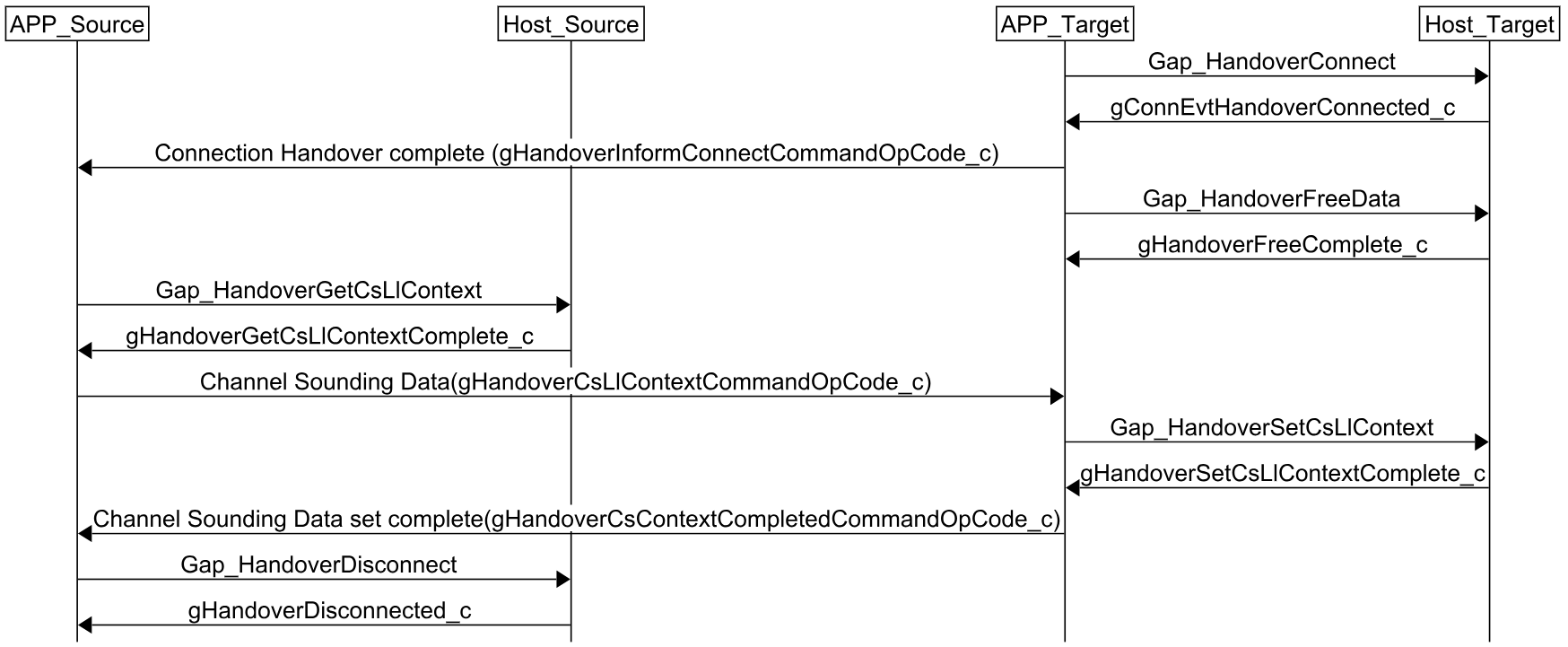
The Connection Handover procedure consists in the Target device taking over the connection from the Source device. It may be performed in two cases:
After a successful Anchor Search procedure, as part of the standard handover flow.
Directly without Time Synchronization or Anchor Search, when Anchor or Packet Monitoring is already active on the Target device.
Connection Handover steps
Target device calls
Gap_HandoverConnect()to initiate the connection handover process.Wait for the
gConnEvtHandoverConnected_cevent on the Target device. Once received, the connection has been successfully transferred.Notify the Source device that the Target device has successfully connected to the Device.
If the application does not include Channel Sounding, call
Gap_HandoverDisconnecton the Source device to terminate its connection.The Handover Data is no longer required and may be freed by calling
Gap_HandoverFreeData()on the Target device.Application context may be transferred at this point through application specific means. If Channel Sounding is enabled in the application, the Channel Sounding Context must be transferred.
Additional steps for Channel Sounding applications:
After step 3 above, retrieve the Channel Sounding context on the Source device by calling
Gap_HandoverGetCsLlContext()and wait for thegHandoverGetCsLlContextCompleteevent.Send the Channel Sounding context to the Target device.
Set the context in the Target device by calling
Gap_HandoverSetCsLlContext()and wait for thegHandoverSetCsLlContextComplete_cevent.Notify the Source device that the Channel Sounding context has been successfully set.
Call
Gap_HandoverDisconnect()on the Source device to terminate its connection. When complete, thegHandoverDisconnected_cevent will be sent.
Connection Handover signaling chart