IWxxx Thread & Zigbee Dualpan solution in NXP i.MX Matter
Introduction
The IWxxx NXP chipsets (IW612, IW610) features highly integrated 2.4/5 GHz dual-band 1x1 Wi-Fi 6, Bluetooth/Bluetooth Low Energy 5.4 and 802.15.4 tri-radio single-chip solution.
NXP i.MX meta-nxp-connectivity Yocto layer provides Yocto recipes to enable Matter, OpenThread, and Zigbee for i.MX MPU.
The prerequisite is to follow the instructions to first build the complete i.MX Matter image.
The following sections specifically describe how to experiment Zigbee & Thread Dualpan features with 3-radio IWxxx NXP chipsets, for example, IW612 or IW610.
Dedicated IWxxx Zigbee stack and examples are introduced first.
Finally, the last section details a complete IWxxx Dualpan example on i.MX: Matter to Zigbee Bridge Application.
IWxxx Dualpan Architecture
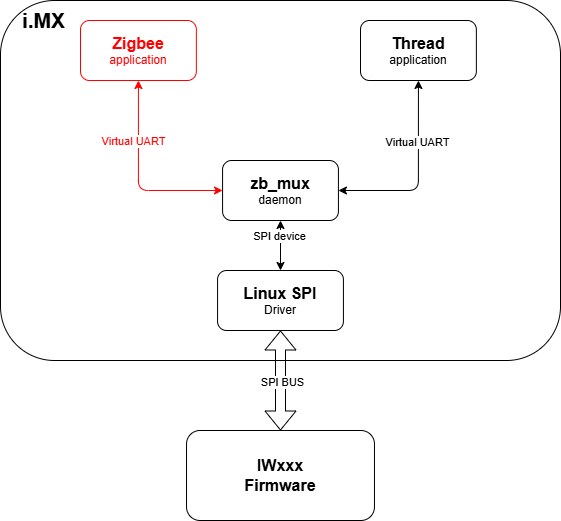
Thread and Zigbee i.MX Host applications run on top of a SPI Multiplexer daemon called zb_mux.
The zb_mux daemon uses i.MX SPI kernel device to exchange Spinel messages with IWxxx Firmware through SPI Bus.
The zb_mux daemon also creates two Virtual UART devices that both Zigbee and Thread applications use to communicate seamlessly with IWxxx Firmware.
IWxxx Zigbee Stack and Examples
meta-nxp-connectivity comes with a certified Zigbee stack for IWxxx chipsets.
It is provided by a single Yocto recipe:
zigbee-rcp-sdk: zb_mux daemon, IWxxx Zigbee Stack header files and static libraries, Linux Systemd services and scripts, IWxxx Zigbee Stack Development Guide documentation, and example applications C source code with CMAKE build files.
NOTE: Additional important resources can be accessed from the NXP website. It requires a login and access to these resources: Latest IW612 Zigbee DualPan package is available SD-WLAN-UART-BT-SPI-OT-Zigbee-DualPAN-IW612-LNX_6_12_20-IMX8-18.99.3.p25.7-18.99.3.p25.7-MM6X18537.p9-GPL.
It includes:
- README_Zboss_package_for_Zigbee.txt
- Example applications source code
Zigbee SDK
Once the i.MX Matter image is built, all zigbee-rcp-sdk components can be found in the Yocto build folder.
For example, for a MACHINE=imx93evk-iwxxx-matter build, the fetched nxp_zboss_libs_sdk repository is unpacked in ${MY_YOCTO}/bld-xwayland-imx93evk-iwxxx-matter/tmp/work/armv8a-poky-linux/zigbee-rcp-sdk/1.0/sources/zigbee-rcp-sdk-1.0/.
zigbee-rcp-sdk recipe goal is to:
Fetch and build the nxp_zboss_libs_sdk repository, which contains the Zigbee Stack and example applications.
Apply patches to add and/or modify example applications (hello, cli_nxp, dualpan_nxp, and so on).
Install zb_mux daemon and Systemd Zigbee services on the i.MX Root Filesystem.
Install Zigbee header files and static libraries in the Yocto build system to build Zigbee example applications.
Install IWxxx Zigbee Stack Development Guide documentation.
Install example application executables in /usr/bin.
Zigbee Examples
Example applications are included in the nxp_zboss_libs_sdk repository.
The zigbee-rcp-sdk recipe applies patches to add and/or modify example applications.
Create a new Zigbee application
To develop a new Zigbee application, follow these steps:
Step 1: Modify the fetched repository
After the initial build, modify the fetched repository directly in the build directory:
cd ${MY_YOCTO}/bld-xwayland-imx93evk-iwxxx-matter/tmp/work/armv8a-poky-linux/zigbee-rcp-sdk/1.0/sources/zigbee-rcp-sdk-1.0
Create your new application files:
mkdir -p examples/my_zigbee_gateway
cat << 'EOF' > examples/my_zigbee_gateway/CMakeLists.txt
#
# Copyright 2026 NXP
#
# NXP Proprietary. This software is owned or controlled by NXP and may only be
# used strictly in accordance with the applicable license terms.
#

cmake_minimum_required(VERSION 3.10.2)

project(my_zigbee_gateway)

# Build my_zigbee_gateway Coordinator executable
add_zigbee_executable(
    NAME my_zigbee_gw_zc
    ROLE COORDINATOR
    SOURCES
        examples/my_zigbee_gateway/my_gw_zc.c
)
EOF
Create your application source files (my_gw_zc.c, etc.) with your custom implementation.
Step 2: Add your application to the build
Edit the main CMakeLists.txt to include your application:
echo "include(\${CMAKE_CURRENT_SOURCE_DIR}/examples/my_zigbee_gateway/CMakeLists.txt)" >> CMakeLists.txt
Step 3: Test the build
Compile and test your application without creating a permanent patch:
cd ${MY_YOCTO}/bld-xwayland-imx93evk-iwxxx-matter
bitbake -fc compile zigbee-rcp-sdk
The application will be built. Transfer the executable to your i.MX target and test:
ls -l tmp/work/armv8a-poky-linux/zigbee-rcp-sdk/1.0/build/my_zigbee_gw_zc
Step 4: Create a patch (once testing is successful)
Once your application is verified on the i.MX target, create a permanent patch similarly as done in the existing 0001-Add-new-hello-Zigbee-application.patch.
cd ${MY_YOCTO}/sources/meta-nxp-connectivity/meta-nxp-zigbee-rcp/recipes-zigbee-rcp-sdk/files

cat << 'EOF' > 0002-Add-my-zigbee-gateway-application.patch
Upstream-Status: Inappropriate [new application]
From: Your Name <your.email@nxp.com>
Date: <date>
Subject: [PATCH] Add new my_zigbee_gateway application

--- a/CMakeLists.txt
+++ b/CMakeLists.txt
@@ -36,3 +36,4 @@ include(${CMAKE_CURRENT_SOURCE_DIR}/examples/r23_new_api/CMakeLists.txt)
 include(${CMAKE_CURRENT_SOURCE_DIR}/examples/hello/CMakeLists.txt)
 include(${CMAKE_CURRENT_SOURCE_DIR}/examples/cli_nxp/CMakeLists.txt)
 include(${CMAKE_CURRENT_SOURCE_DIR}/examples/dualpan_nxp/CMakeLists.txt)
+include(${CMAKE_CURRENT_SOURCE_DIR}/examples/my_zigbee_gateway/CMakeLists.txt)

--- /dev/null
+++ b/examples/my_zigbee_gateway/CMakeLists.txt
@@ -0,0 +1,18 @@
+#
+# Copyright 2026 NXP
+#
+# NXP Proprietary. This software is owned or controlled by NXP and may only be
+# used strictly in accordance with the applicable license terms.
+#
+
+cmake_minimum_required(VERSION 3.10.2)
+
+project(my_zigbee_gateway)
+
+add_zigbee_executable(
+    NAME my_zigbee_gw_zc
+    ROLE COORDINATOR
+    SOURCES
+        examples/my_zigbee_gateway/my_gw_zc.c
+)
+
+--- /dev/null
+++ b/examples/my_zigbee_gateway/my_gw_zc.c
@@ -0,0 +1,xx @@
+/* Your application source code */
EOF
Step 5: Add the patch to the recipe
Add the new patch to the recipe file:
cd ${MY_YOCTO}/sources/meta-nxp-connectivity/meta-nxp-zigbee-rcp/recipes-zigbee-rcp-sdk
echo 'SRC_URI += "file://0002-Add-my-zigbee-gateway-application.patch"' >> ../zigbee-rcp-sdk.bb
Step 6: Clean, build, and rebuild
Perform a clean build to apply the patch:
cd ${MY_YOCTO}/bld-xwayland-imx93evk-iwxxx-matter
bitbake -fc cleanall zigbee-rcp-sdk
bitbake zigbee-rcp-sdk
Step 7: Verify the final build
Verify that your application is in the final install directory:
ls -l tmp/work/armv8a-poky-linux/zigbee-rcp-sdk/1.0/image/usr/bin/my_zigbee_gw_zc
The application is now ready to be deployed on the i.MX target.
Matter to Zigbee Bridge Example
MatterZigbeeRcp-bridge application demonstrates the complete Matter example on i.MX93 & IW612.
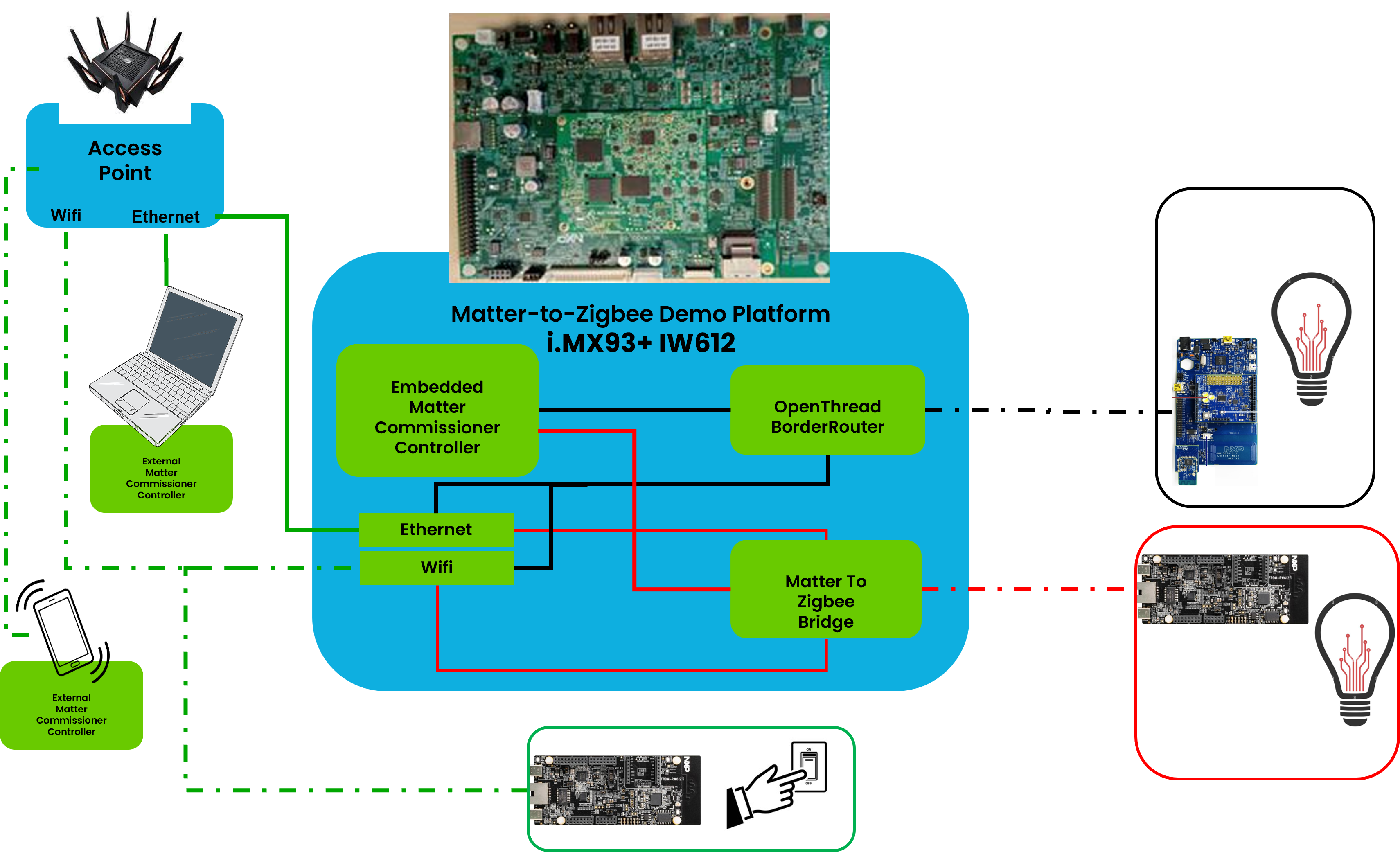
The i.MX Matter image allows to have a complete Matter Controller on one single i.MX93&IW612 platform:
Embedded Posix Openthread BorderRouter manages a Thread network and provides Ethernet or Wi-Fi networks connectivity.
Matter chip-tool is used to commission and control Matter Wireless End-Devices, either on Wi-Fi or on Thread networks.
M2ZigbeeRcp-bridge is a Zigbee Coordinator allowing Zigbee End-Devices to join, and transforming them into Matter Bridged End-Devices.
NOTE: Both meta-nxp-connectivity native otbr-agent-iwxxx and chip-tool executables are not intended to be modified.
M2ZigbeeRcp-bridge is currently an example of a Matter to Zigbee bridge.
It is intended to be modified, and its features improved as explained in the dynamic-endpoint-control section.