
Kconfig and customization of OTA examples#
The OTA examples support an alternative way to adjust the default project settings using Kconfig. For more information about Kconfig, please see the MCUXpresso SDK documentation.
Encrypted XIP mode#
This is one of the ways to build and evaluate projects configured for Encrypted XIP mode. For more information please see Encrypted XIP and MCUboot.
The following walkthrough for the EVKBMIMXRT1060 and the IAR toolchain demonstrates how to enable Encrypted XIP mode.
Build the GUI configuration
west build -p always examples/ota_examples/mcuboot_opensource --toolchain iar --config flexspi_nor_release -b evkbmimxrt1060 -t guiconfig -d builds/evkbmimxrt1060_mcuboot
Modify settings in Middleware->MCUboot
enable
Add support for encrypted XIPandUse custom device configurationenable
Enable Encrypted XIP modefill in the addresses of the active and candidate application and the metadata - the default values from
flash_partitioning.hor themcuboot_opensourceboard readme can be reused

Click Save and close the window.
Navigate to the folder with the generated project and run
west build -t guiproject
Note: -t guiproject is optional; for the IAR toolchain it generates the IDE project.
MCUboot and Crypto backend selection#
MCUboot in the SDK supports these crypto backend options:
TinyCrypt
a lightweight crypto library for resource-constrained devices
full feature support
Mbed TLS using the legacy API
built-in implementation only (no hardware crypto accelerators)
full feature support
Mbed TLS using the PSA Crypto API
supports hardware crypto accelerators (requires a PSA driver)
currently not compatible with Encrypted XIP mode, as encrypted images are not supported by the PSA API in the current MCUboot version
By default, TinyCrypt is used for memory-constrained NXP devices such as MCX N (bootloader in the IFR region), MCX A, and MCX E. Other NXP devices with external flash memory typically use Mbed TLS with PSA to take advantage of hardware acceleration of the crypto algorithms. If the Encrypted XIP feature is enabled, Mbed TLS switches to the legacy API.
Since Mbed TLS using the legacy API has only software implementation of crypto functions, it may be desirable to replace Mbed TLS with TinyCrypt to reduce the memory footprint of MCUboot. The same applies in the opposite direction when replacing TinyCrypt with Mbed TLS using the PSA Crypto API.
The following walkthrough demonstrates how to replace Mbed TLS with TinyCrypt. The example is for the EVKBMIMXRT1060 and the IAR toolchain.
Build the GUI configuration
west build -p always examples/ota_examples/mcuboot_opensource --toolchain iar --config flexspi_nor_release -b evkbmimxrt1060 -t guiconfig -d builds/evkbmimxrt1060_mcuboot
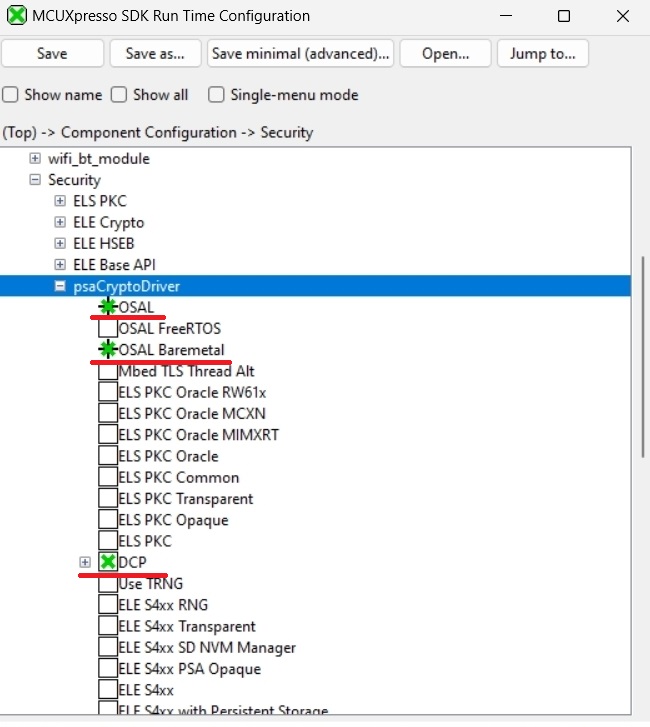
Remove any PSA Crypto driver occurrences in Component Configuration->Security, and any related drivers in Driver Configuration
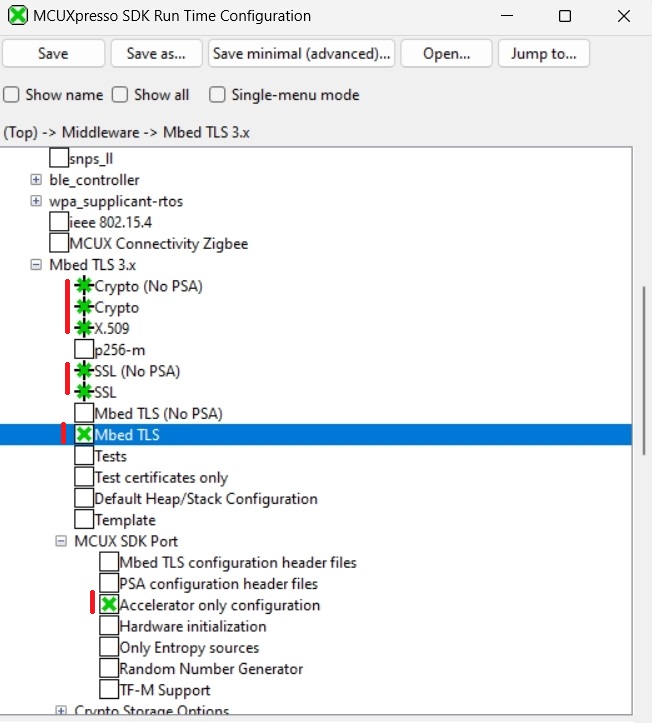
Remove Mbed TLS middleware and all related components
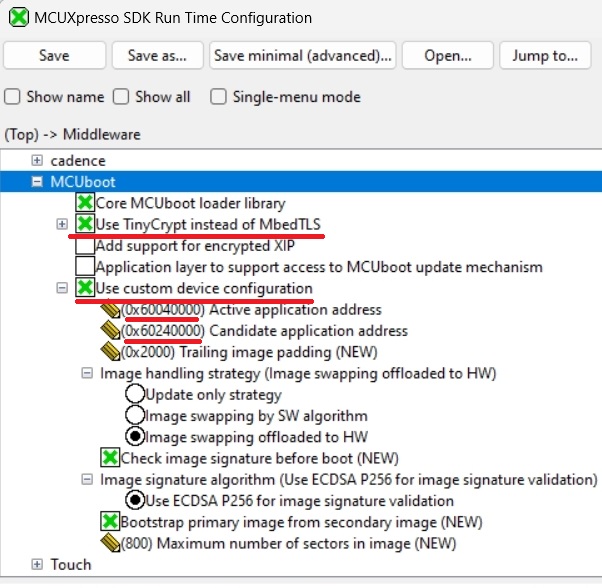
Enable TinyCrypt and custom device configuration in MCUboot configuration
Click Save and close the window.
Navigate to the folder with the generated project and run
west build -t guiproject
Note: -t guiproject is optional; for the IAR toolchain it generates the IDE project.
With this configuration, the final size of the MCUboot application is approximately 30 kB.