Working with CMake Projects
CMake Projects
CMake projects are self-contained examples that rely only on CMake, without requiring a separate SDK repository to be imported. SDKs built on the MCUXpresso SDK Builder support downloading such standalone examples, as opposed to the full SDK archive.
Downloading a CMake project
After building an MCUXpresso SDK, open the download section and select the Download Standalone Example Project option.

Select the desired example project and click on Download Example.
Importing a CMake project
The project archive can be imported by opening the Import Project menu in the Quickstart Panel. The Import path should be the downloaded archive.
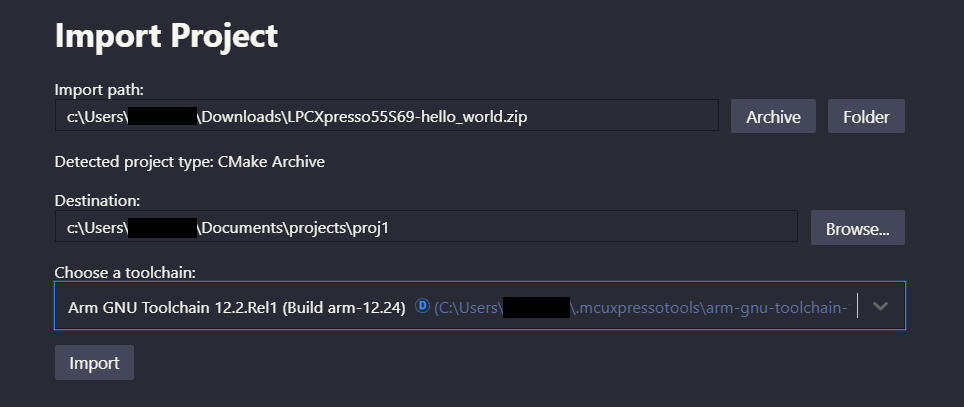
The project can be built just like any other project, however debugging it will open a wizard to ask for more information since there is no associated repository.
Note: If you are working with an archive that contains multiple CMake-based freestanding projects, use the Import Multiple Projects command from the command palette instead of the single-project import wizard. This command supports direct import from an archive and enables extraction and import of all contained projects in a single operation. See Import Multiple Projects for more details.
Associating a repository
Associating a repository to a CMake project is optional, but it can be done by entering the context menu of the project and selecting the Associate Repository option under the Configure tab of the menu. Two quick picks are then shown to select the repository to associate to and the target device.
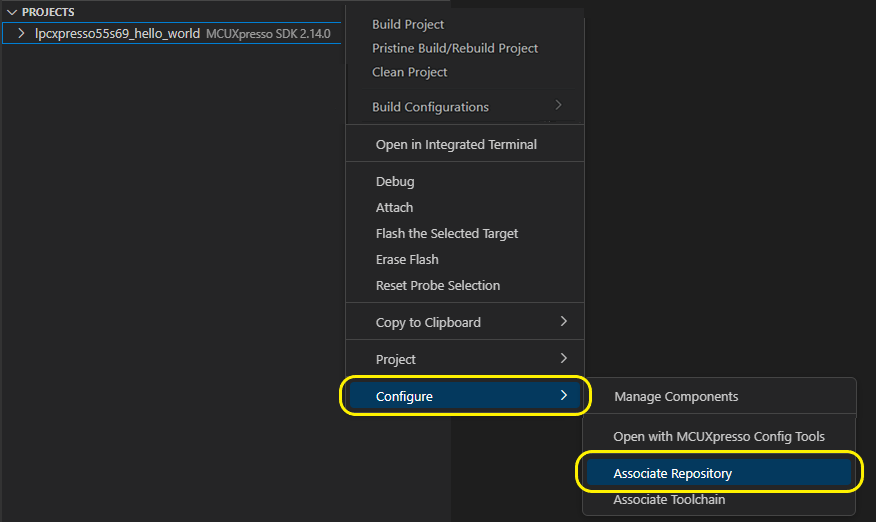
Building and debugging the project
For building and debugging the project, the standard steps described in Build Project section and debug documentation sections should be followed.